Welcome to the Treehouse Community
Want to collaborate on code errors? Have bugs you need feedback on? Looking for an extra set of eyes on your latest project? Get support with fellow developers, designers, and programmers of all backgrounds and skill levels here with the Treehouse Community! While you're at it, check out some resources Treehouse students have shared here.
Looking to learn something new?
Treehouse offers a seven day free trial for new students. Get access to thousands of hours of content and join thousands of Treehouse students and alumni in the community today.
Start your free trial

Nick Winner
615 PointsHow can I put these elements on one same line?
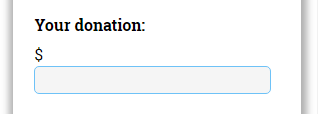
On this image you can see, that I have the dollar sign and input["number"] field. I want to make the input's width to "100% - width of the dollar sign". So that they will be on the same line. How can I perform this?
Thanx in advance!
2 Answers

Sue Dough
35,800 PointsUse CSS on the elements.
display: inline-block;

Alex Flores
7,864 PointsWhat Sue said, but I'd like to add that you can use <span> tag. It's like a div, but it's natural property is inline. I'd go with what Sue said though.