Welcome to the Treehouse Community
Want to collaborate on code errors? Have bugs you need feedback on? Looking for an extra set of eyes on your latest project? Get support with fellow developers, designers, and programmers of all backgrounds and skill levels here with the Treehouse Community! While you're at it, check out some resources Treehouse students have shared here.
Looking to learn something new?
Treehouse offers a seven day free trial for new students. Get access to thousands of hours of content and join thousands of Treehouse students and alumni in the community today.
Start your free trial

Justin Sze Wei Teo
9,418 Points2 Errors in CSS Validator
Hi,
I encountered 2 errors in the W3C CSS Validator, please see screenshot below,
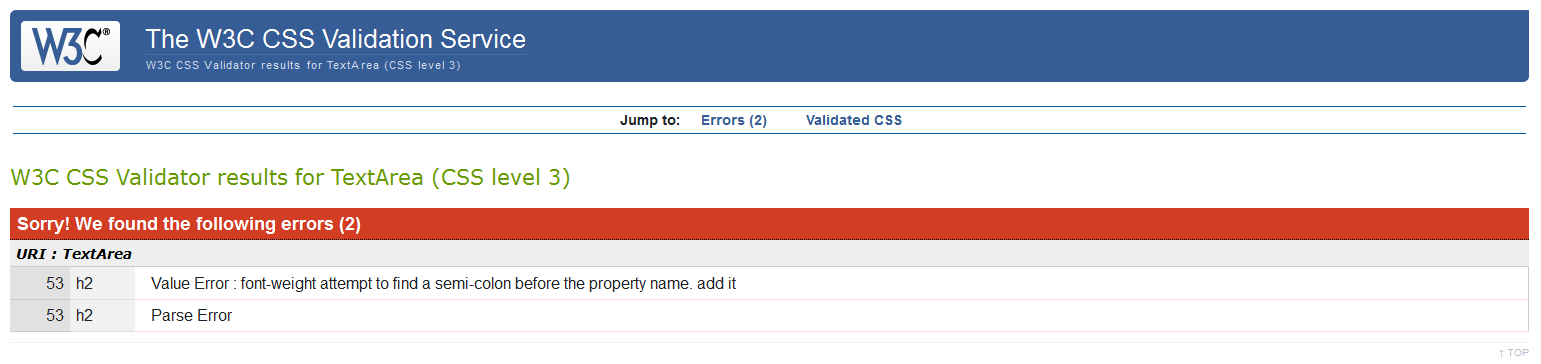
I looked through my code and am unsure of the following,
1) "h2 Value Error : font-weight attempt to find a semi-colon before the property name. add it " , what is this value error referring to?
2) "h2 Parse Error " , what is this referring to?
Please find my main.css code below,
/*********************
GENERAL
**********************/

body {
  font-family: 'Open Sans', sans-serif;
}

#wrapper {
  max-width: 940px;
  margin: 0 auto;
  padding: 0 5%;
}

a {
  text-decoration:none;
}

img {
  max-width: 100%;
}

h3 {
  margin: 0 0 1em 0;
}
/*********************
HEADING
**********************/

header {
  float:left;
  margin: 0 0 30px 0;
  padding: 5px 0 0 0;
  width: 100%
}

#logo {
  text-align: center;
  margin: 0;
}

h1 {
  font-family:'Changa One', sans-serif;
  margin: 15px 0;
  font-size: 1.75em;
  font-weight:normal;
  line-height:0.8em;
}

h2 {
    margin: -5px 0 0;
    font-size: 0.75em;
    font-weight:normal:

}


/*********************
NAVIGATION
**********************/

nav {
  text-align: center;
  padding: 10px 0;
  margin: 20px;
}

nav ul {
  list-style: none;
  margin:0 10px;
  padding: 0;
}

nav li {
  display: inline-block;
}

nav a {
  font-weight: 800;
  padding: 15px 10px;
}


/*********************
FOOTER
**********************/

footer {
  font-size: 0.75em;
  text-align: center;
  clear: both;
  padding-top: 50px;
  color:  #ccc;

}

.social-icon {
  width: 20px;
  height: 20px;
  margin: 0 5px;
}

/*********************
PAGE: PORTFOLIO
**********************/

#gallery {
  margin: 0;
  padding: 0;
  list-style: none;
}

#gallery li {
  float: left;
  width: 45%;
  margin: 2.5%;
  background-color: #f5f5f5;
  color: #bdc3c7;
}

#gallery li a p {
  margin: 0;
  padding: 5%;
  font-size:0.75em;
  color: #bdc3c7;
}


/*********************
PAGE: ABOUT
**********************/

.profile-photo {
  clear:both;
  display:block;
  max-width: 150px;
  margin: 0 auto 30px;
  border-radius: 20%;
}

/*********************
PAGE: CONTACT
**********************/

.contact-info {
  list-style: none;
  padding: 0;
  margin: 0;
  font-size: 0.9em;
}

.contact-info a {
 display:block;
 min-height: 20px;
 background-repeat:no-repeat;
 background-size: 20px 20px;
 padding: 0 0 0 30px;
 margin: 0 0 10px;
}

.contact-info li.phone a {
 background-image: url('../Images/phone.png')
}

.contact-info li.mail a {
 background-image: url('../Images/mail.png')
}

.contact-info li.twitter a {
 background-image: url('../Images/twitter.png')
}


/*********************
COLORS
**********************/

/*Site Body*/
body {
background: #fff;
color:#999;
}

/* Green Header*/
header {
  background:#6ab47b;
  border-color:#599a68;
}

/* nav background on mobile*/
nav {
  background: #599a68;
}

/* Logo Text*/
h1, h2 {
  color: #fff;
}

/* Links*/
a {
  color:#6ab47b;
}


/* nav link*/
nav a, nav a:visited {
  color:#fff;
}

/* Selected nav link*/
nav a.selected, nav a:hover {
 color:#32673f;
}
Appreciate any help I can get, thanks guys!
2 Answers

Alejandro Mesa
9,813 Pointsh2 {
margin: -5px 0 0;
font-size: 0.75em;
font-weight:normal ; <!-- Change the last semi-colon -->
}

Geert Van Campenhout
7,308 PointsBetter response Alejandro :-) Just checking some of the comment markup now:
- italic
- bold
- code
Where on the keyboard can you find them backticks (''')to mark text as code?
          <p>This is code!</p>
          ```

Justin Sze Wei Teo
9,418 PointsThis helped, very careless of me, thanks!
Alejandro Mesa
9,813 PointsGeert Van Campenhout
You can find the sticks (```) next to number 1 in-between Esc and Tab (at least my 3 keyboards are like that)
<h1>Hello</h1>
<h2>Cheers</h2>
Geert Van Campenhout
7,308 PointsGeert Van Campenhout
7,308 Pointsyour "font-weight: normal:" needs a semi-colon ";" instead of a colon..
h2 { margin: -5px 0 0; font-size: 0.75em; font-weight:normal:
}
See if that helps solve your issue?