Welcome to the Treehouse Community
Want to collaborate on code errors? Have bugs you need feedback on? Looking for an extra set of eyes on your latest project? Get support with fellow developers, designers, and programmers of all backgrounds and skill levels here with the Treehouse Community! While you're at it, check out some resources Treehouse students have shared here.
Looking to learn something new?
Treehouse offers a seven day free trial for new students. Get access to thousands of hours of content and join thousands of Treehouse students and alumni in the community today.
Start your free trial

Arnaud Ardans II
5,089 PointsAbout Page - mail/twitter/phone Icon stays left under paragraph
So I've come to the realization that I'm not sure what is going on here. <p><p> I've been playing with this for quite a while, used Chrome Development Tools, and nothing. <p><p> I know it is probably something that I missed, but my eyes must be missing something. <p><p><p><p>
Image of Problem:
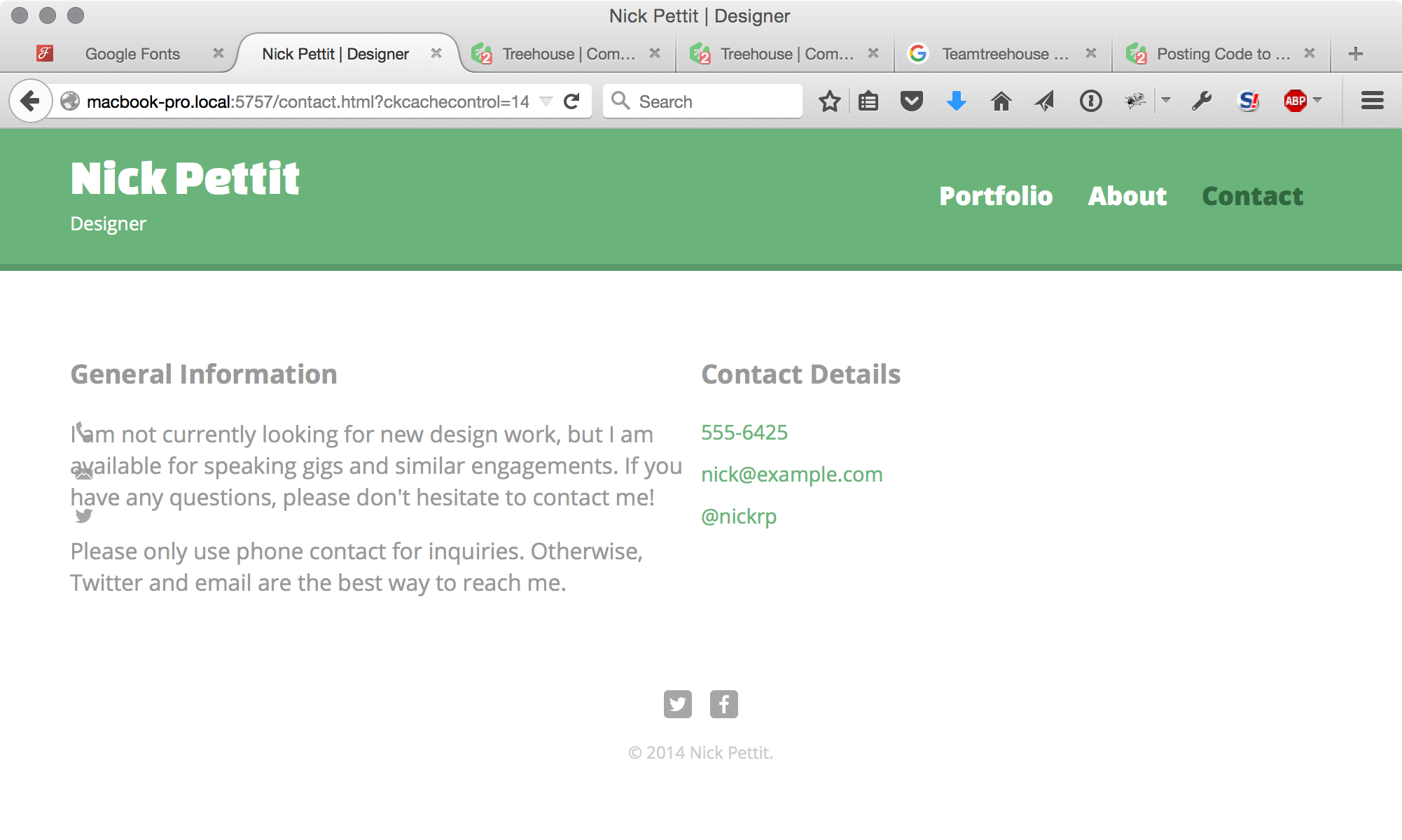
about.html
<!DOCTYPE html>
<html>
<head>
<meta charset="utf-8">
<title>Nick Pettit | Designer</title>
<link rel="stylesheet" href="css/normalize.css">
<link href='http://fonts.googleapis.com/css?family=Changa+One|Open+Sans:400italic,700italic,400,700,800' rel='stylesheet' type='text/css'>
<link rel="stylesheet" href="css/main.css">
<link rel="stylesheet" href="css/responsive.css">
<meta name="viewport" content="width=device-width, initial-scale=1.0">
</head>
<body>
<header>
<a href="index.html" id="logo">
<h1>Nick Pettit</h1>
<h2>Designer</h2>
</a>
<nav>
<ul>
<li><a href="index.html">Portfolio</a></li>
<li><a href="about.html">About</a></li>
<li><a href="contact.html" class="selected">Contact</a></li>
</ul>
</nav>
</header>
<div id="wrapper">
<section id="primary">
<h3>General Information</h3>
<p>I am not currently looking for new design work, but I am available for speaking gigs and similar engagements. If you have any questions, please don't hesitate to contact me!</p>
<p>Please only use phone contact for inquiries. Otherwise, Twitter and email are the best way to reach me.
</section id="secondary">
<h3>Contact Details</h3>
<ul class="contact-info">
<li class="phone"><a href="tel:555-6425">555-6425</a></li>
<li class="mail"><a href="mailto:nick@example.com">nick@example.com</a></li>
<li class="twitter"><a href="twitter.com/intent/tweet?screen_name=nickrp">@nickrp</a></li>
</ul>
<footer>
<a href="http://twitter.com/nickrp"><img src="img/twitter-wrap.png" alt="Twitter Logo" class="social-icon"></a>
<a href="http://facebook.com/nickpettit"><img src="img/facebook-wrap.png" alt="Facebook Logo" class="social-icon"></a>
<p>© 2014 Nick Pettit.</p>
</footer>
</div>
</body>
</html>
main.css
/**************************************************
GENERAL
**************************************************/

body {
  font-family: 'Open Sans', sans-serif;
}

#wrapper {
  max-width: 940px;
  margin: 0 auto;
  padding: 0 5%;
}

a {
  text-decoration: none;
}

img {
  max-width: 100%;
}

h3{
  margin: 0 0 1em 0;
}


/**************************************************
HEADING
**************************************************/

header {
  float: left;
  margin: 0 0 30px 0;
  padding: 5px 0 0 0;
  width: 100%;
}

#logo {
  text-align: center;
  margin: 0;
}

h1 {
  font-family: 'Changa One', sans-serif;
  margin: 15px 0;
  font-size: 1.75em;
  font-weight: normal;
  line-height: 0.8em;
}

h2 {
  font-size: 0.75em;
  margin: -5px 0 0;
  font-weight: normal;
}


/**************************************************
NAVIGATION
**************************************************/

nav {
  text-align: center;
  padding: 10px 0;
  margin: 20px 0 0;
}

nav ul {
  list-style: none;
  margin: 0 10px;
  padding: 0;
}

nav li {
  display: inline-block;
}

nav a {
  font-weight: 800;
  padding: 15px 10px;
}


/**************************************************
FOOTER
**************************************************/

footer {
  font-size: 0.75em;
  text-align: center;
  clear: both;
  padding-top: 50px;
  color: #ccc;
}

.social-icon {
  width: 20px;
  height: 20px;
  margin: 0 5px;
}


/**************************************************
PAGE: PORTFOLIO
**************************************************/

#gallery {
  margin: 0;
  padding: 0;
  list-style: none;
}

#gallery li {
  float: left;
  width: 45%;
  margin: 2.5%;
  background-color: #f5f5f5;
  color: #bdc3c7;
}

#gallery li a p {
  margin: 0;
  padding: 5%;
  font-size: 0.75em;
  color: #bdc3c7;
}


/**************************************************
PAGE: ABOUT
**************************************************/

.profile-photo {
  clear: both;
  display: block;
  max-width: 150px;
  margin: 0 auto 30px;
  border-radius: 20px;
}


/**************************************************
PAGE: CONTACT
**************************************************/

.contact-info {
  list-style: none;
  padding: 0;
  margin: 0;
  font-size: 0.9em;
}

.contact-info a {
  display: block;
  min-height: 20px;
  background-repeat: no-repeat;
  background-size: 20px 20px;
  padding: 0 0 0 30px;
  margin: 0 0 10px 0;
}

.contact-info li.phone a {
  background-image: url('../img/phone.png');
}

.contact-info li.mail a {
  background-image: url('../img/mail.png');
}

.contact-info li.twitter a {
  background-image: url('../img/twitter.png');
}


/**************************************************
COLORS
**************************************************/

/* Site Body */
body {
  background-color: #fff;
  color: #999;
}

/* Green Header */
header {
  background: #6ab47b;
  border-color: #599a68;
}

/* nav Background */
nav {
  background: #599a68;
}

/* Logo Text */
h1, h2 {
  color: #fff;
}

/* link color */
a {
  color: #6ab47b;
}

/* nav link */
nav a, nav a:visited {
  color: #fff;
}

/* selected nav line */
nav a.selected, nav a:hover {
  color: #32673f;
}
responsive.css
@media screen and (min-width: 480px) {

  /**************************************************
  TWO COLUMN LAYOUT
  **************************************************/
  #primary {
    width: 50%;
    float: left;
  }

  #secondary {
    width: 40%;
    float: right;
  }


  /**************************************************
  PAGE: PORTFOLIO
  **************************************************/

  #gallery li {
    width: 28.3333%;
  }

  #gallery li:nth-child(4n) {
    clear: left;
  }

  /**************************************************
  PAGE: ABOUT
  **************************************************/

  .profile-photo {
    float: left;
    margin: 0 5% 80px 0;
  }

}

@media screen and (min-width: 860px) {

  /**************************************************
  HEADER
  **************************************************/

  nav {
    background: none;
    float: right;
    font-size: 1.125em;
    margin-right: 5%;
    text-align: right;
    width: 45%;
  }

  #logo {
    float: left;
    margin-left: 5%;
    text-align: left;
    width: 45%;
  }

  h1 {
    font-size: 2.2em;
  }

  h2 {
    font-size: 0.825em;
    margin-bottom: 20px;
  }

  header {
    border-bottom: 5px solid #599a68;
    margin-bottom: 60px;
  }

}
1 Answer

Quantice Appleton
2,775 PointsI am new at this but I will give it a shot. It looks like your section tags may be off. On the about.html page there is no closing tag for section id="primary". Then your beginning tag for section id="secondary", starts with a closing tag when it should be your opening tag. You will need to close the end of your section for id="secondary" as well. This may fix the problem.
Gunhoo Yoon
5,027 PointsGunhoo Yoon
5,027 PointsAre you trying to have separate section for id="secondary"? Try fixing that first.