Welcome to the Treehouse Community
Want to collaborate on code errors? Have bugs you need feedback on? Looking for an extra set of eyes on your latest project? Get support with fellow developers, designers, and programmers of all backgrounds and skill levels here with the Treehouse Community! While you're at it, check out some resources Treehouse students have shared here.
Looking to learn something new?
Treehouse offers a seven day free trial for new students. Get access to thousands of hours of content and join thousands of Treehouse students and alumni in the community today.
Start your free trial

Alex Goldberg
Courses Plus Student 2,408 PointsAndroid Studio Bundle extraction failure Windows 64bit set up
I'm consistently receiving the error message "File extraction failed. The archive may be corrupted, not readable, or an incompatible format".
I'm running a Windows 64 bit set up and have been trying to extract the files specified for that set up.
Any clue why this is happening? And is there an alternative zip file hosted somewhere else that I can try fetching it from?
Thanks! And I love team tree house!
2 Answers

William Li
Courses Plus Student 26,868 PointsSounds like the downloaded file is corrupted, this can happen when a network connection issue occurred while the file was being downloaded, (especially for big file).
have you tried download it again?
Go to this link to download the Android tools you need. The page also provided SHA-1 Checksum which you can use to match against your downloaded installer to verify file Integrity.
If you are not familiar with how to perform Checksum on a file, I believe the easiest and most painless way is by installing the HashCheck Shell Extension on Windows.
With HashCheck Shell Extension installed.
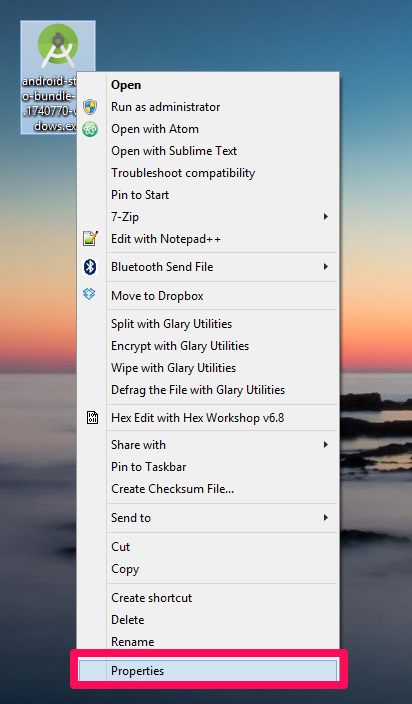
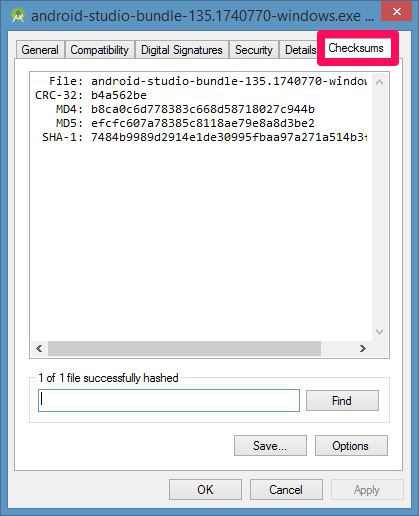
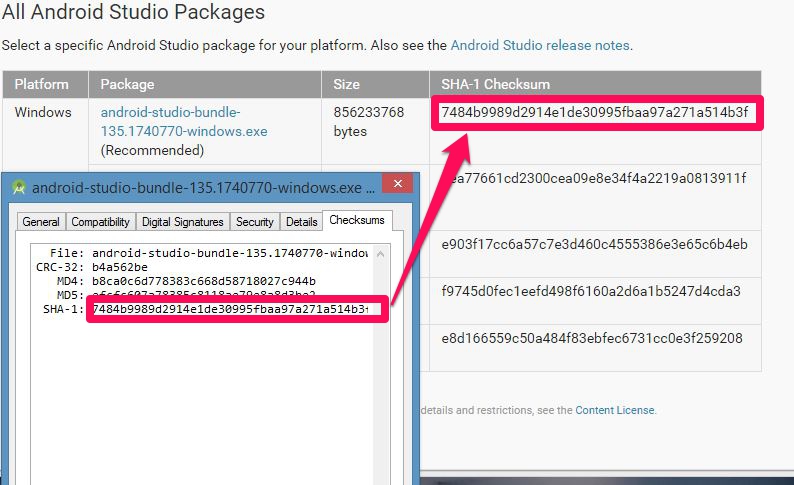
The SHA-1 strings of your downloaded file has to be EXACT match with the SHA-1 listed on the Android download page; otherwise the file is corrupted.
Hope this helps.
Alex Goldberg
Courses Plus Student 2,408 PointsThanks, great job providing a solution! I also really appreciate you letting me in on the checksum plug in:)
-Alex