Welcome to the Treehouse Community
Want to collaborate on code errors? Have bugs you need feedback on? Looking for an extra set of eyes on your latest project? Get support with fellow developers, designers, and programmers of all backgrounds and skill levels here with the Treehouse Community! While you're at it, check out some resources Treehouse students have shared here.
Looking to learn something new?
Treehouse offers a seven day free trial for new students. Get access to thousands of hours of content and join thousands of Treehouse students and alumni in the community today.
Start your free trial

Aakash Srivastav
Full Stack JavaScript Techdegree Student 11,638 PointsBootstrap4
Here is my HTML code for the section part of the html-
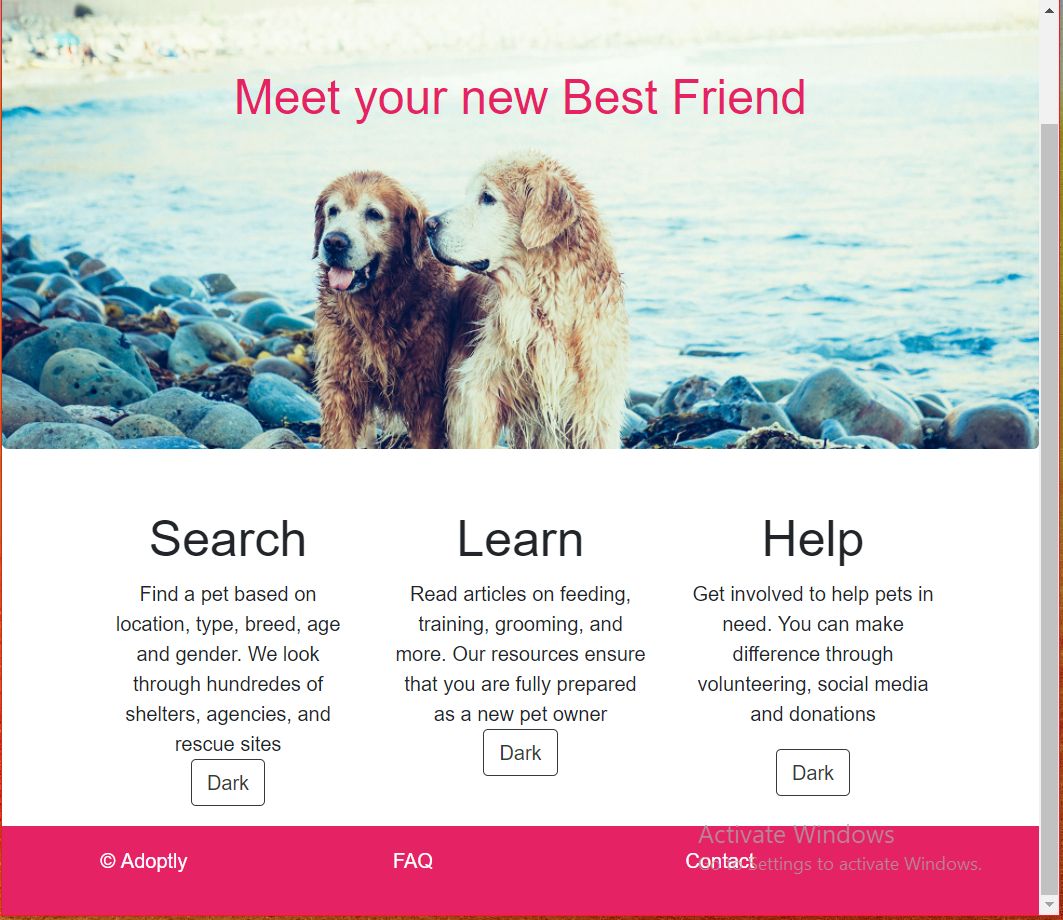
<section>
            <div class="container px-4 text-center">
                <div class="row">
                    <div class="col-sm py-3">
                        <h1>Search</h1>
                        <p class="mb-auto">Find a pet based on location, type, breed, age and gender. We look through hundredes of shelters, agencies, and rescue sites</p>
                        <button type="button" class="btn btn-outline-dark mt-auto">Dark</button>
                    </div>
                    <div class="col-sm py-3">
                        <h1>Learn</h1>
                        <p class="mb-auto">Read articles on feeding, training, grooming, and more. Our resources ensure that you are fully prepared as a new pet owner</p>
                        <button type="button" class="btn btn-outline-dark mt-auto">Dark</button>
                    </div>
                    <div class="col-sm py-3">
                        <h1>Help</h1>
                        <p >Get involved to help pets in need. You can make difference through volunteering, social media and donations
                        </p>
                        <button type="button" class="btn btn-outline-dark mt-auto">Dark</button>
                    </div>
                </div>
            </div>
</section>
In the second col of the container , the button element is not sticked to the bottom of the container . I want it to be get sticked to the bottom of the container irrespective of the content inside it.
What will be the best method in Bootstrap4 in .
What will be the best bootstrap way to achive this.
1 Answer

Dean Paterson
12,996 PointsBootstrap might have its own syntax for what your looking to achieve, but is plain css I’d set the container position to relative and the button class to position absolute - bottom, center (or left/right) depending where you want it