Welcome to the Treehouse Community
Want to collaborate on code errors? Have bugs you need feedback on? Looking for an extra set of eyes on your latest project? Get support with fellow developers, designers, and programmers of all backgrounds and skill levels here with the Treehouse Community! While you're at it, check out some resources Treehouse students have shared here.
Looking to learn something new?
Treehouse offers a seven day free trial for new students. Get access to thousands of hours of content and join thousands of Treehouse students and alumni in the community today.
Start your free trial

Rick Rakin
6,531 PointsBuild a Responsive Website Code Challenge trouble (Scalable Images)
In Creating a Fluid Foundation, Code Challenge: Scalable Images, the question I'm having difficulty with:
Convert the padding on .cake from pixels to percentages.
The rule of thumb taught is when setting flexible margins on an element, your context is the width of the element's container. Since flexible padding isn't discussed, I assume (perhaps wrongly) that the same thumb rule is applied to this code challenge.
Since .cake's container is .icing, the context is 700px. So 10px/700px works out to 1.428571429%
That answer is marked wrong.The one that is accepted implies that the context needed is 600px. That would mean that .cake is .cake's containing element. Something is not right.
Here is the codepen copied right from the challenge, unedited.
5 Answers

James Barnett
39,199 PointsRichard Rakin -
Just to make sure we are all on the same page, I believe the code challenge you are having issues with is scaleable images.
I think the issue you are having is that you missed the hint that was in the comment right at the top of the code challenge, so I took a screenshot of it and marked them with a red arrow.
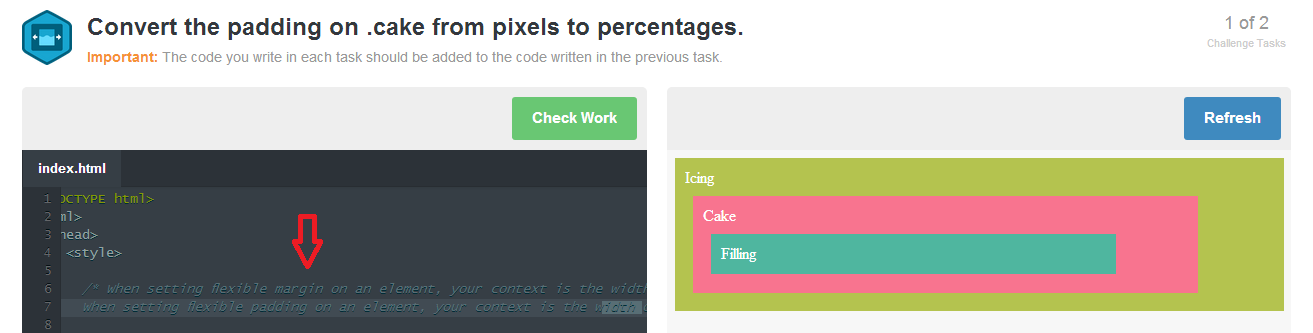
The instructions that the red arrow point to in the picture read as follows:
When setting flexible margin on an element, your context is the width of the element’s container.
When setting flexible padding on an element, your context is the width of the element itself.
Question #1 is Convert the padding on .cake from pixels to percentages.
Since the we are converting padding, the hint (that I referenced earlier with the red arrow) said we should to use the element's width as our context.
Given the formula of target / context = result
We end up with ...
padding of element / width of element = result
- padding =
10px - width =
600px
The last step is to convert it to a percentage we multiple by 100.
--
Let us know if you are still having issues with this code challenge.

Chase Lee
29,275 PointsRichard Rakin, could you please put a link to the code challenge?

Martin Teran
Courses Plus Student 3,166 PointsCheck out the <percentage> explanation here:
https://developer.mozilla.org/en-US/docs/Web/CSS/padding#Syntax
In your case you would use 600px.

Rick Rakin
6,531 PointsThat percentage explanation reads about the same as the margin explanation: https://developer.mozilla.org/en-US/docs/Web/CSS/margin#Syntax
For the prior coding challenge, the containing div was always used as the context for margin conversion from px to percent values. If this question were worded to convert margin, the correct answer would be 700px. So why 600px for padding then?
This means either things are different when converting padding or the coding challenge is wrong. I suspect the coding challenge is wrong, hence why I started this thread in addition to resurrecting an older one a few hours ago.

Colin Stodd
3,160 PointsI've been having problems with this as well! I did find the correct answer to be 1.7% but thats through pure luck of guessing. however the next question, I'm getting the same problems. Have you found the correct explanation?

Damian Andrews
9,475 PointsAs stated above for padding, you'd use the width of .filling itself for the context. So 10 / 500 = 0.02 * 100 = 2%
Chase Lee
29,275 PointsUse the size of .icing as the context.
Rick Rakin
6,531 PointsThat's what I think. Gives wrong answer though.
Rick Rakin
6,531 PointsRick Rakin
6,531 PointsA-ha! I did overlook the comments. So it is slightly different when dealing with padding. Thanks for pointing this out.
Zachary Kapsch
Courses Plus Student 881 PointsZachary Kapsch
Courses Plus Student 881 PointsThank you! I finally understand it now! :-)
Spencer O'Neill
9,384 PointsSpencer O'Neill
9,384 PointsThe best way to think about it (for me at least) is as follows:
We all know the box model starts with Margin > Border > Padding > Content. My understanding of why the margin uses a context of the container is because there isn't anything between them.
With the padding, the next element above it is the margin. Also note that the margin contains everything within the element. It is only because the margin is the top level, so to speak, that it is only contained by the element above it.
I feel like I was probably a bit redundant there, but maybe this can help explain it differently in a way that's better than just accepting that as fact.