Welcome to the Treehouse Community
Want to collaborate on code errors? Have bugs you need feedback on? Looking for an extra set of eyes on your latest project? Get support with fellow developers, designers, and programmers of all backgrounds and skill levels here with the Treehouse Community! While you're at it, check out some resources Treehouse students have shared here.
Looking to learn something new?
Treehouse offers a seven day free trial for new students. Get access to thousands of hours of content and join thousands of Treehouse students and alumni in the community today.
Start your free trial

Johnny BeGood
1,710 PointsButtons Don't Change Color
When I click play or next, my font just minimizes, the background color to my list item doesn't change.
//PLAYLIST.JS
function Playlist() {
  this.songs = [];
  this.nowPlayingIndex = 0;
}

Playlist.prototype.add = function(song) {
  this.songs.push(song);
};

Playlist.prototype.play = function() {
  var currentSong = this.songs[this.nowPlayingIndex];
  currentSong.play();
};

Playlist.prototype.stop = function(){
  var currentSong = this.songs[this.nowPlayingIndex];
  currentSong.stop();
};

Playlist.prototype.next = function() {
  this.stop();
  this.nowPlayingIndex++;
  if(this.nowPlayingIndex === this.songs.length) {
    this.nowPlayingIndex = 0;
  }
  this.play();
};

Playlist.prototype.renderInElement = function(list) {
  list.innerHTML = "";
  for (var i = 0; i < this.songs.length; i++) {
    list.innerHTML += this.songs[i].toHTML();
  }
};
//SONG.JS
function Song(title, artist, duration) {
  this.title = title;
  this.artist = artist;
  this.duration = duration;
  this.isPlaying = false;
}

Song.prototype.play = function() {
  this.isPlaying = true;
};

Song.prototype.stop = function() {
  this.isPlaying = false;
};

Song.prototype.toHTML = function() {
  var htmlString = '<li';
  if(this.isPlaying === true) {
  htmlString += 'class="current"';
  }
  htmlString += '>';
  htmlString += this.title;
  htmlString += ' - ';
  htmlString += this.artist;
  htmlString += '<span class="duration">';
  htmlString += this.duration;
  htmlString += '</span></li>';
  return htmlString;
};
//APP.JS
var playlist = new Playlist();

var hereComesTheSun = new Song("Here Comes the Sun", "The Beatles", "2:54");
var walkingOnSunshine = new Song("Walking on Sunshine", "Katrina and the Waves", "3:43");

playlist.add(hereComesTheSun);
playlist.add(walkingOnSunshine);

var playlistElement = document.getElementById("playlist");

playlist.renderInElement(playlistElement);

var playButton = document.getElementById("play");
 playButton.onclick = function () {
  playlist.play();
  playlist.renderInElement(playlistElement);
}

var nextButton = document.getElementById("next");
nextButton.onclick = function () {
  playlist.next();
  playlist.renderInElement(playlistElement);
}

var stopButton = document.getElementById("stop");
stopButton.onclick = function () {
  playlist.stop();
  playlist.renderInElement(playlistElement);
}
1 Answer

Sean Henderson
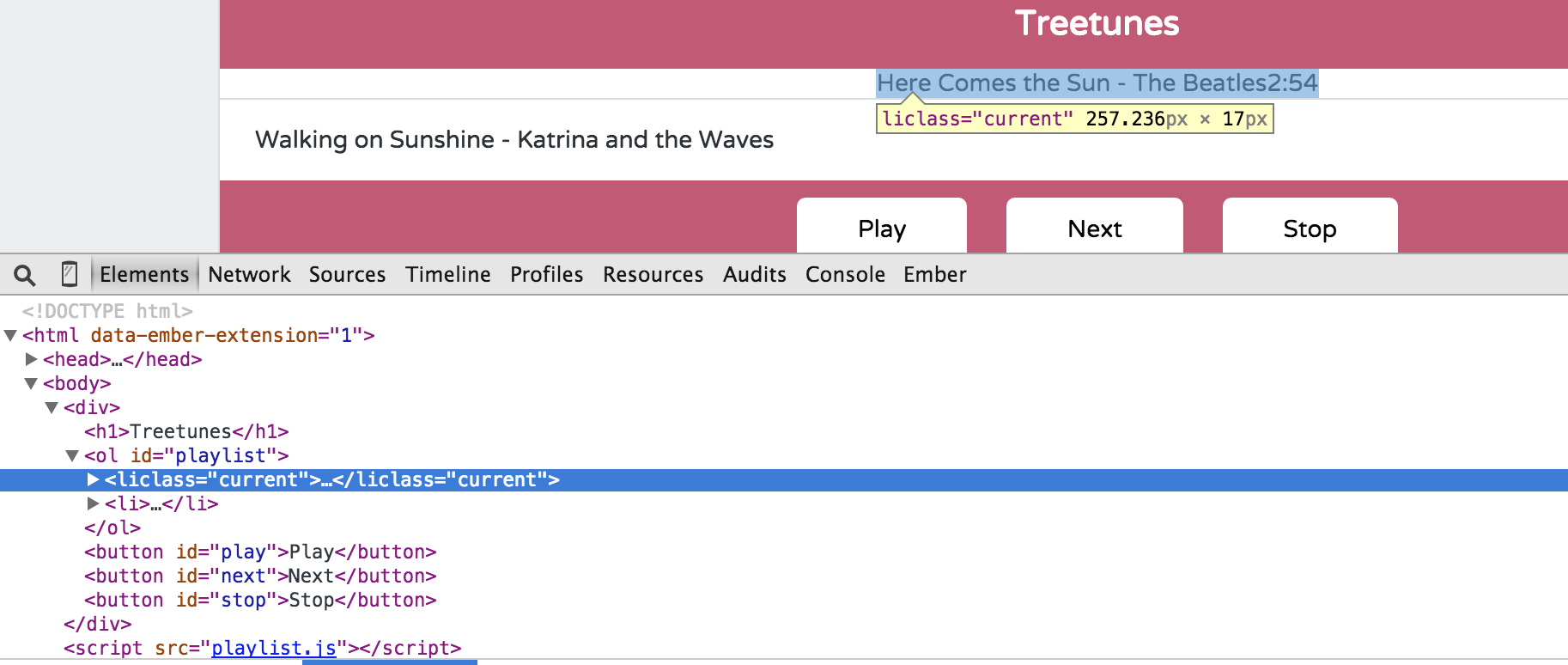
15,413 PointsFound the problem. There's no space between the li and class attribut in htmlString, so the class doesn't compute.
var htmlString = '<li';
  if(this.isPlaying === true) {
  htmlString += 'class="current"';
  }
  htmlString += '>';
Changing to this fixed it for me:
var htmlString = '<li';
  if(this.isPlaying === true) {
  htmlString += ' class="current"';
  }
  htmlString += '>';
I was able to figure this out quickly by inspecting the element in Chrome Dev Tools:
Johnny BeGood
1,710 PointsJohnny BeGood
1,710 PointsYeah thanks. You jus taught me another way to use the dev tools.