Welcome to the Treehouse Community
Want to collaborate on code errors? Have bugs you need feedback on? Looking for an extra set of eyes on your latest project? Get support with fellow developers, designers, and programmers of all backgrounds and skill levels here with the Treehouse Community! While you're at it, check out some resources Treehouse students have shared here.
Looking to learn something new?
Treehouse offers a seven day free trial for new students. Get access to thousands of hours of content and join thousands of Treehouse students and alumni in the community today.
Start your free trial

Cassidy Williams
Courses Plus Student 1,602 PointsCan't deploy application to iPhone
I've been following the Build A Simple iPhone app tutorial, and I got to the Device Installation video. Sadly, I typed my password wrong after clicking "Use for Development" for my iPhone, and now I can't deploy it at all.
The error I get is: Code Sign error: The identity 'iPhone Developer' doesn't match any valid, non-expired certificate/private key pair in your keychains
What do I do?
2 Answers

Amit Bijlani
Treehouse Guest TeacherYou could try quitting Xcode and trying to connect again. In addition, there two things that you can check:
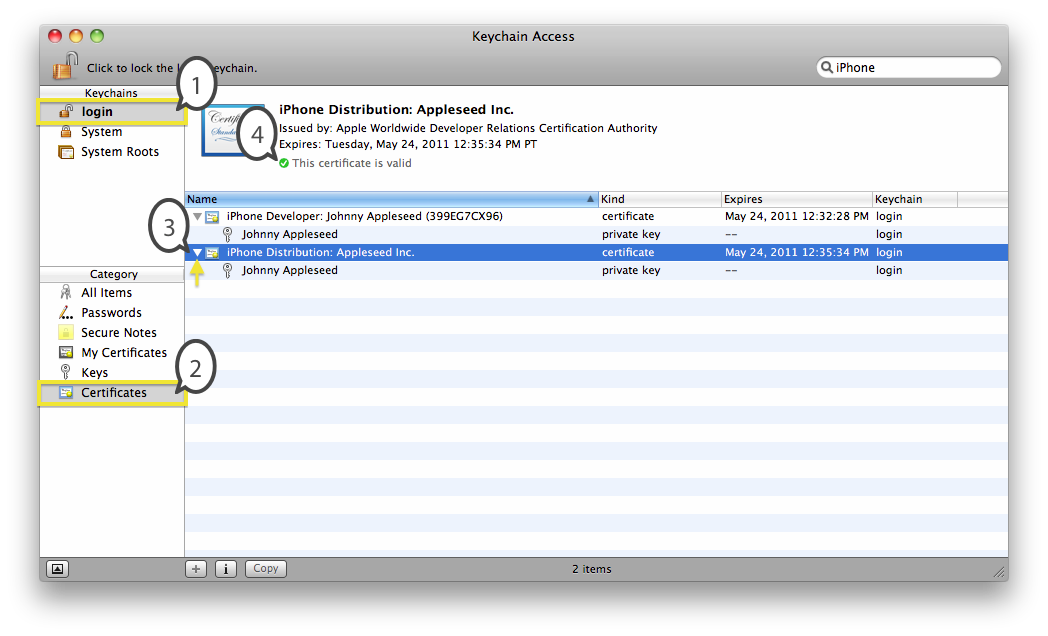
Make sure you have the certificate in your Keychain (Keychain Access is a separate app on your Mac OSX):
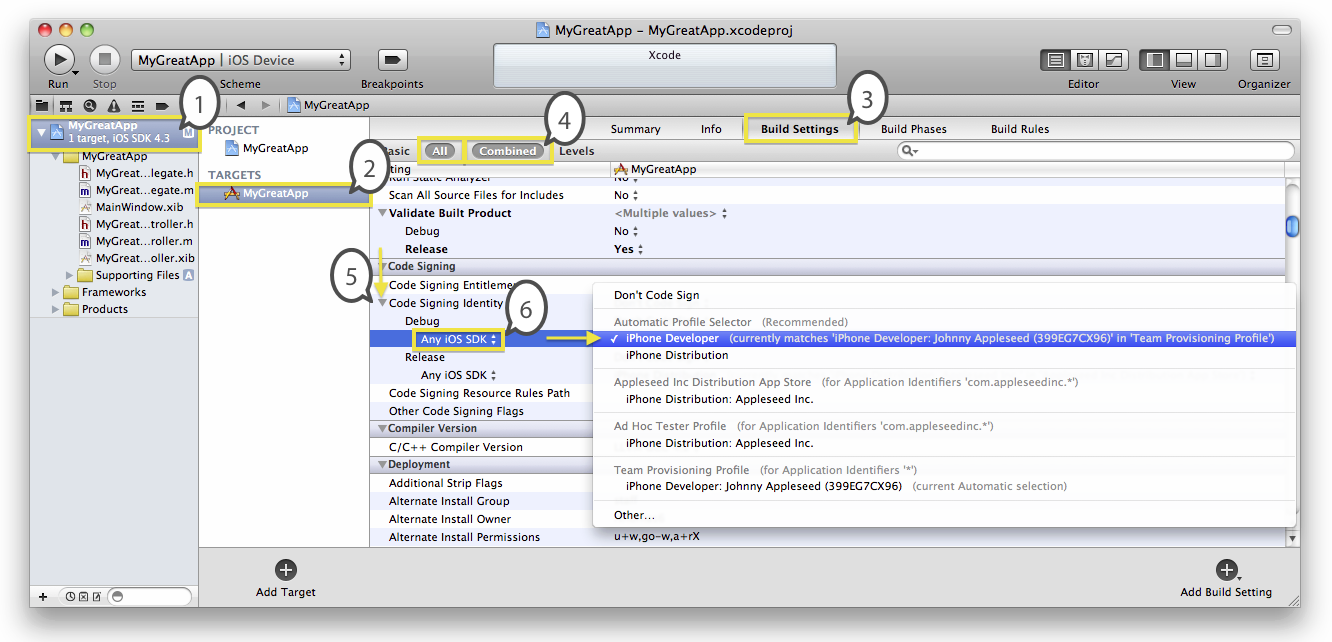
Within Xcode make sure you have the right provisioning profile selected:

Ian Powell
Courses Plus Student 1,379 PointsI had the same problem, I think. I entered my password wrong. Then I finally found the "Add to portal" button on the bottom and it re-prompted my for my password.
Cassidy Williams
Courses Plus Student 1,602 PointsCassidy Williams
Courses Plus Student 1,602 PointsI don't have the certificate, and in the provisioning profile it just says, "iPhone Developer" not matching anything. How do I get the certificate?
Amit Bijlani
Treehouse Guest TeacherAmit Bijlani
Treehouse Guest TeacherIt sounds like you would need to redo the steps in the Device Installation video. Make sure you close out Xcode, remove your device and then start over.
Cassidy Williams
Courses Plus Student 1,602 PointsCassidy Williams
Courses Plus Student 1,602 PointsI've tried doing that, but I can't seem to get back to the state in which it will allow me to re-enter my information. Is there a way to remove my phone or something so I get the "Use for Development" button back?
Amit Bijlani
Treehouse Guest TeacherAmit Bijlani
Treehouse Guest TeacherIn that same window on the left sidebar under Library, click on Provisioning Profiles and hit refresh at the bottom. It should prompt you to create a certificate.
Cassidy Williams
Courses Plus Student 1,602 PointsCassidy Williams
Courses Plus Student 1,602 PointsOkay, I've done that, and I get "Too few items in teams." What should I do there?
Amit Bijlani
Treehouse Guest TeacherAmit Bijlani
Treehouse Guest TeacherI've never encountered that error but here's a post where people share the solution: http://stackoverflow.com/questions/12171278/too-few-items-in-teams
Mike Bronner
16,395 PointsMike Bronner
16,395 PointsI just had the "Too few items in Teams" as well. The solution was to go to the Provisioning Portal and create a new profile specific for my domain name, in my case "com.rocking-mm.*" After that I right-clicked on my iPhone listed in Organizer, unplugged it, then plugged it back in. It then asked me for my Apple ID and password again, and it downloaded the updated provisioning profile -- you may need to go to Library > Provisioning Profiles, and click the refresh button to have it try to re-download the profiles.
After a bit of fiddling around along the lines above, I was able to get it working. Good luck :)
Mike Bronner
16,395 PointsMike Bronner
16,395 PointsOh, I also had to call Apple Developer support to remove a hold on the approval of the developer account. It seemed fairly routine, I don't recall the reason they held the approval.