Welcome to the Treehouse Community
Want to collaborate on code errors? Have bugs you need feedback on? Looking for an extra set of eyes on your latest project? Get support with fellow developers, designers, and programmers of all backgrounds and skill levels here with the Treehouse Community! While you're at it, check out some resources Treehouse students have shared here.
Looking to learn something new?
Treehouse offers a seven day free trial for new students. Get access to thousands of hours of content and join thousands of Treehouse students and alumni in the community today.
Start your free trial

Meg I-w
3,457 PointsChrome DevTools showing a different result w/r/t the JS 'this' keyword
I'm probably lacking the fluency in JavaScript vocabulary to explain the peculiarity that I'm experiencing properly, but my brow has been furrowed for the past half-hour straight, so I figure asking is worth a shot!
In the Objects: Methods lesson of JavaScript Foundations, the teacher, Jim Hoskins, introduces the 'this' keyword in JS and gives a couple examples. However, when I typed the same code and tried it out in my Chrome browser with DevTools, what I'm seeing doesn't line up with Jim's output or with what he has said about the 'this' keyword.
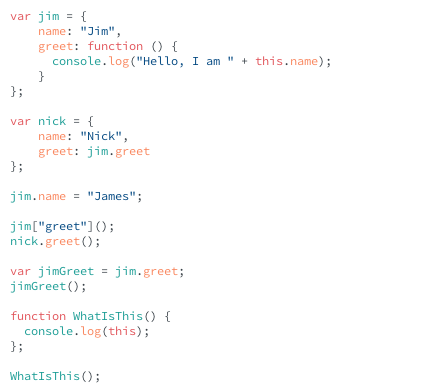
Here is the code that he wrote/I copied:
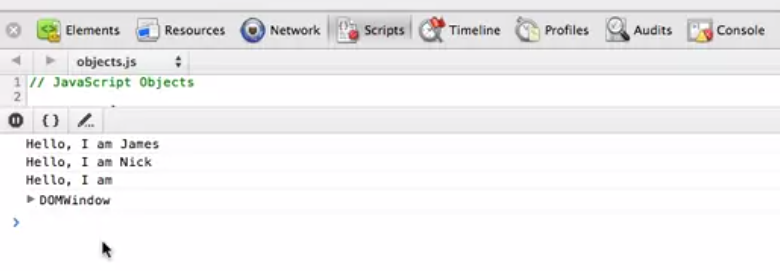
Here is what was spit out in his console.log:
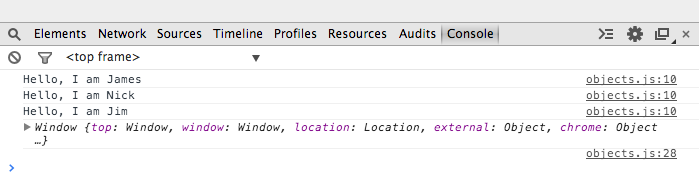
And here is mine:
Can anyone help me understand what's going on here?
3 Answers

Jason Anello
Courses Plus Student 94,610 PointsHi Meg,
Are you able to reproduce this? Do you by any chance still have the code you typed that produced the output you have? Post it here in a code block if you can.
When I type in all the code in your screenshot then I get output similar to Jim's. The 4th output matches your output if I do it in chrome but it looks a little different in firebug. I think the 4th output will be dependent upon the developer tools you're using.
The concern I think is the 3rd output and why the string "Jim" would still exist at that point.
This is the code I've typed in if you want to paste this into your console and try:
var jim = {
    name: "Jim",
    greet: function () {
        console.log("Hello, I am " + this.name);
    }
};

var nick = {
    name: "Nick",
    greet: jim.greet
};

jim.name = "James";

jim["greet"]();
nick.greet();

var jimGreet = jim.greet;
jimGreet();

function WhatIsThis() {
    console.log(this);
};

WhatIsThis();
Even if you had made an error in typing this code I can't figure out what it would have been to produce that output

gabriel siqueira
7,405 PointsOh ok, yeah now I'm curious too, sorry I couldn't help you with that. I'll let you know if I find out ;)
gabriel siqueira
7,405 PointsI think you closed the first function() with "}};" => twice with the } sign
Meg I-w
3,457 PointsThanks for the response Gabriel! However, I think the two sets of curly braces ('{' and '}') are correct in the case of the 'jim' variable. The outer set surrounds the key-value pairs for my object, but since one of my values is a function, I need to open up an inner set of curly braces to contain the body of the function. This is the same syntax that is used in the lesson video, so it wouldn't account for the difference between my console output and the one in the video.
I was able to get through the lesson and coding challenge without any trouble, but I'm just really curious as to why this difference occurred!
Jason Anello
Courses Plus Student 94,610 PointsJason Anello
Courses Plus Student 94,610 PointsIn the 3rd output when calling
jimGreet()thisshould be referring to the Window object I think. Thenameproperty on the window object is an empty string and so I think that explains Jim's output and what I'm getting myself.If I add
this.name = "JIm"to the code I posted above then I do get the output that you were originally getting.That is setting the
nameproperty of the window object to "Jim" if I understand it right. So then jimGreet() is going to output Jim's name.Do you think that you could have run that statement at some point? I think that if you had ran that statement at some point and hadn't refreshed the page before running the above code in your screenshot then you would be getting your output.
I think that's one possible explanation assuming you did that.
Meg I-w
3,457 PointsMeg I-w
3,457 PointsJason,
I am pretty perplexed by all of this, but I think you must have been onto something about possibly setting this.name to a value at some point. I refreshed the page multiple times, but then (semi-accidentally) opened the same index.html file in a new window, and got the expected outcome, finally. The original console window still wasn't correct until I completely closed DevTools and re-opened it.
It's possible that the Methods video had us change the .name of the Window object to prove a point, and maybe that completely threw my DevTools console off-kilter, even after I refreshed the browser tab multiple times. I'll look back at what Jim does in the video once my brain reconstitutes itself a bit.
Thanks a ton for your help!