Welcome to the Treehouse Community
Want to collaborate on code errors? Have bugs you need feedback on? Looking for an extra set of eyes on your latest project? Get support with fellow developers, designers, and programmers of all backgrounds and skill levels here with the Treehouse Community! While you're at it, check out some resources Treehouse students have shared here.
Looking to learn something new?
Treehouse offers a seven day free trial for new students. Get access to thousands of hours of content and join thousands of Treehouse students and alumni in the community today.
Start your free trial

Gregg Mojica
11,506 PointsConverting .XIB to iPhone 5
I recently found an old project I was working on a while back - one created with a nib and only designed for the iPhone 4s and lower (so not iPhone 5 optimized). How can I convert the existing nib to work with both the larger iPhone 5 resolution and iPhone 4 resolution (I don't want to use two nibs)?
Thanks!
4 Answers

Amit Bijlani
Treehouse Guest TeacherYou can use AutoLayout.
However, you would have to modify your project for iOS 6 and above and enable AutoLayout.
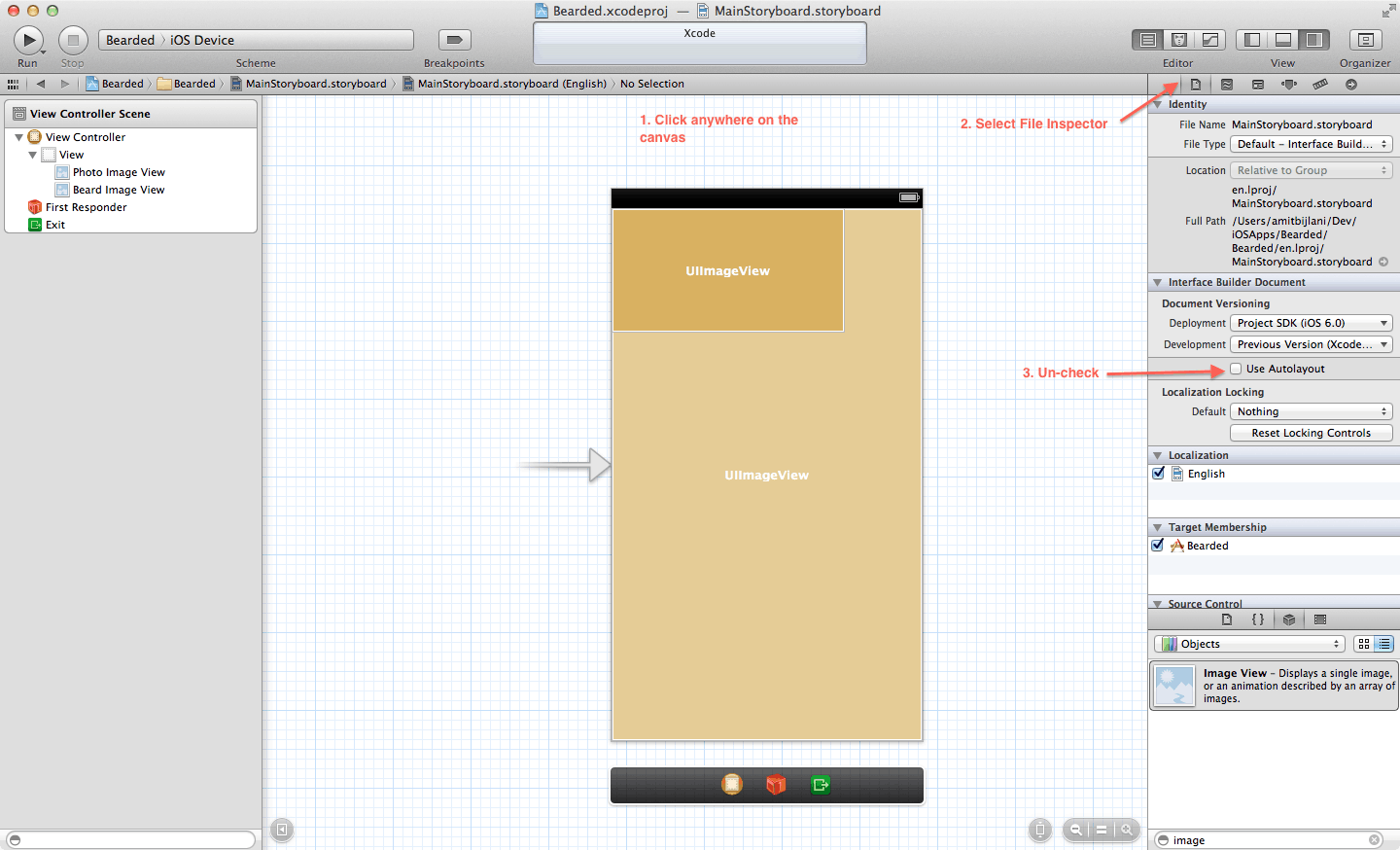
The instructions above say to uncheck but in your case you have to make sure that AutoLayout is selected.
Gregg Mojica
11,506 PointsI followed the steps outlined in your picture. I imagine there is something that I am not doing? Thanks again, Amit.
Gregg Mojica
11,506 PointsThe video was for storyboarding - I'm using a nib.
Amit Bijlani
Treehouse Guest TeacherConstraints for AutoLayout can be added in either a Storyboard or nib. However, I'm not clear as to what you are trying to accomplish. If you can, please share a screenshot of your view describing the problem so I can have a better idea.

Gregg Mojica
11,506 PointsThanks for all your help, Amit. I have an old app I built a log time ago which uses a nib and is optimized for the iPhone 4 and 4s. As a result, when I view the app in the iPhone 5 simulator, there are black bars on either side. My question is how do I optimize the app so that the black bars are no longer visible. I would prefer to use one nib instead of two.
Amit Bijlani
Treehouse Guest TeacherFor your apps to no longer be letter-boxed you have to include a tall Launch image sized 640x1136px. To do so, select the project file in Xcode (top most file in your navigator) under the general tabs you will see a section called "Launch Images". Click on the "Source" drop-down and select "Don't use asset catalogs" and make sure you have provided images for both the sizes. Once you add a taller launch image your app should run regularly in an iPhone 5. The only caveat is that your views don't automatically adjust to the taller screen, you have to manually adjust them with constraints using AutoLayout which is the video I originally linked.
Gregg Mojica
11,506 PointsGregg Mojica
11,506 PointsAmit, I tired that but to no avail. It still appears non iPhone 5 optimized. Where do I go from here? Thanks again!
Amit Bijlani
Treehouse Guest TeacherAmit Bijlani
Treehouse Guest TeacherCan you provide some more details as to what you tried and what did not work.