Welcome to the Treehouse Community
Want to collaborate on code errors? Have bugs you need feedback on? Looking for an extra set of eyes on your latest project? Get support with fellow developers, designers, and programmers of all backgrounds and skill levels here with the Treehouse Community! While you're at it, check out some resources Treehouse students have shared here.
Looking to learn something new?
Treehouse offers a seven day free trial for new students. Get access to thousands of hours of content and join thousands of Treehouse students and alumni in the community today.
Start your free trial

Paris Hunter
1,027 PointsCreating a Website Structure - Working With Grids ~7 minutes in
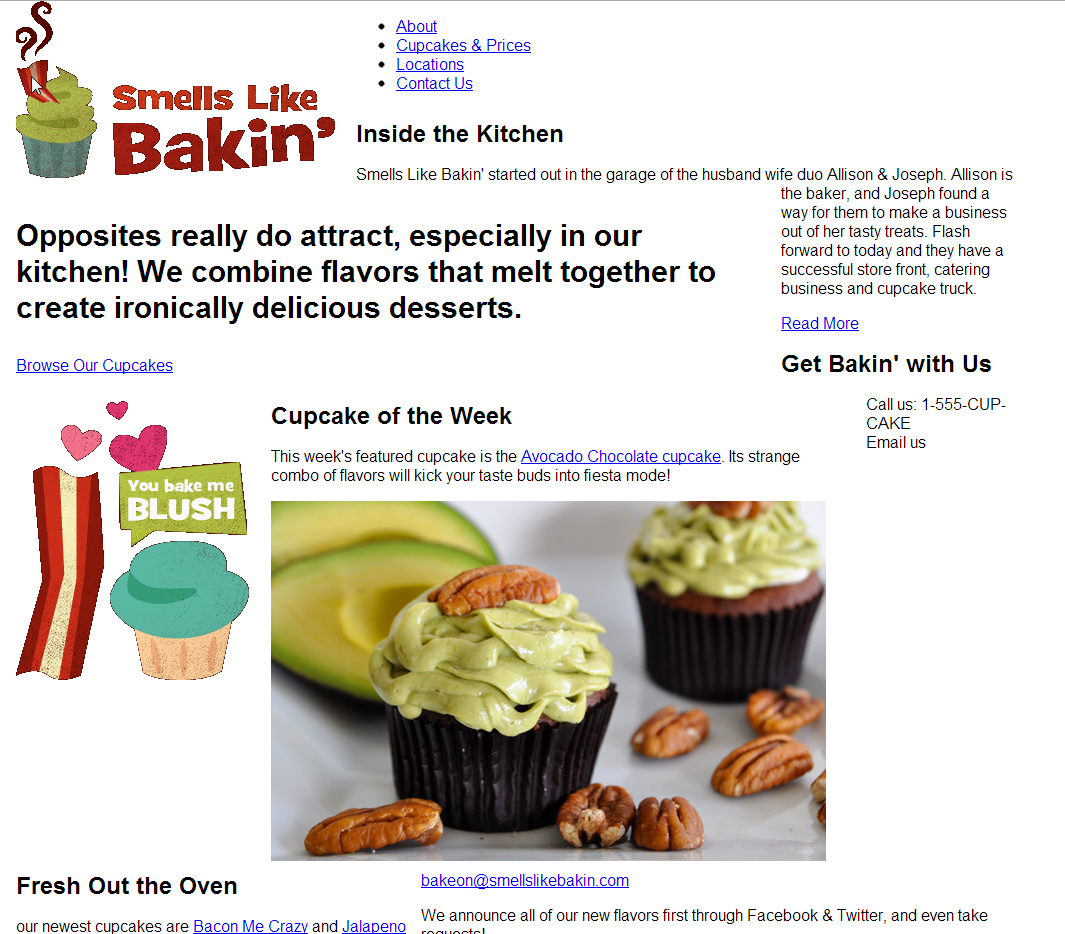
For the life of me, I cannot figure what I am doing wrong on this issue. The last action I should take is to add a div class to new_cupcakes which includes "grid_5 omega". When I actually save and view the website, it looks nothing like the video. I am not looking for the exact answer, just someone to point me in the right direction. Here is what my website look like:
3 Answers

Riphard Nicolas
815 PointsDid you close div under the image before you save it.

James Barnett
39,199 PointsWe can only take educated guessed at where the issue might be without seeing the code.
Please create a codepen with your code and post the link here.

Paris Hunter
1,027 PointsHello.
Here is my code hosted on Codepen; http://cdpn.io/Jixbo
I didn't upload the CCS files because I didn't make any changes to those. .Thank you for the help.
Paris Hunter
1,027 PointsProblem solved. After looking at the completed code and my code for an hour using Notepad++ to compare, I realized one, my <!DOC HTML/> had a slash inside the closing tag and I had some extra spacing issues between lines of code. It really threw off my margins as well. Rookie mistakes but now I understand the importance not forgetting closing brackets and extra spaces between code.

Kalob Kuk
1,491 PointsI'm at the same section and my page is also not matching up. Stupid question, where can I view the correct code for the stage I'm at as opposed to just trying to pause the video and look at little sections at a time? Makes it hard when your mistake may have been at an unknown stage of the video. Thanks!
Paris Hunter
1,027 PointsWhats not matching up exactly? i can tell you where to look if you tell me exactly what is off about it.
Kalob Kuk
1,491 PointsMy alignments just all seem different compared to the project example. I'm done with the structure section, so, pre-css I should have the right layout at this point. For example, the main logo is a grid 4 and the nav contact list is a grid 8 omega but I can't get them side by side. Basically, every element is in a different spot than it should be when I compare them.
<html>
<head>
<meta http-equiv="Content-Type" content="text/html; charset=utf-8"/>
<title>Smells Like Bakin' Cupcake Company</title>
<link rel="stylesheet" href="css/normalize.css" type="text/css" media="screen">
<link rel="stylesheet" href="css/grid.css" type="text/css" media="screen">
</head>
<body>
<div class="container clearfix">
<div class="grid_4">
<img src="img/logo.gif" alt="Smells Like Bakin">
</div>
<div class="grid_8" omega>
<ul class="nav">
<li><a href="#">About</a></li>
<li><a href="#">Cupcakes & Prices</a></li>
<li><a href="#">Locations</a></li>
<li class="last"><a href="#">Contact Us</a></li>
</ul>
</div>
<div id="intro" class="grid_9">
<h1>Opposites really do attract, especially in our kitchen! We combine unexpexted flavors that melt together to create ironically delicious desserts.</h1>
<p><a href="#" class="btn">Browse Our Cupcakes</a></p>
</div>
<div class="grid_3" omega>
<img src="img/you-bake-me-blush.gif" alt="You Bake Me Blush">
</div>
<div id="featured-cupcake" class="grid_7">
<h2>Cupcake of the Week</h2>
<p>This week's featured cupcake is the <a href="#">Avadaco Chocolate cupcake</a>. Its strange combo of flavors will kick your taste buds into fiesta mode!</p>
<img src="img/featured-cupcake.jpg" alt="Avacado Chocolate Cupcake">
</div>
<div id="new-cupcakes" class="grid_5 omega">
<h2>Fresh Out the Oven</h2>
<p>Our newest cupcakes are <a href="#">Bacon Me Crazy</a> and <a href="#">Jalapeno So Spicy</a>.</p>
<img src="img/new-cupcake-bacon.jpg" Alt="Bacon Me Crazy">
<img src="img/new-cupcake-Jalapeno.jpg" Alt="Jalapeno So Spicy">
</div>
<div class="grid_7">
<h2>Inside the Kitchen</h2>
<p>Smells Like Bakin' started out in the garage of the husband wife duo Allison & Joseph. Allison is the baker, and Jason found a way for them to make a business out of her tasty treats. Flash forward to today and they have a succesful store front, catering business and cupcake truck. </p>
<p><a href="#" class="btn-small">Read More</a></p>
</div>
<div class="grid_5 omega">
<h2>Get Bakin' With Us</h2>
<div id="contact">
<p>Call us: <span>1-555-CUP-CAKE</span><br>
Email us: <a href="#">bakeon@smellslikebakn.com</a></p>
</div>
<p>We announce all of our new flavors first through Facebook & Twitter, and even take requests!</p>
<a href="http://www.facebook.com/SmwllsLikeBakin"><img src="img/facebook.gif" Alt="Facebook"></a>
<a href="https://twitter.com/#!/smellslikebakin"><img src="img/twitter.gif" Alt="Twitter"></a>
</div>
<div id="copyright" class="grid_12">
<p>© 2012 Smells Like Bakin' Cupcake Company. All Rights Reserved.</p>
</div>
</div>
</body>
</html>
Kalob Kuk
1,491 PointsAAHH haha it was my omega, I didn't put it inside the quotes on the first two instances!