Welcome to the Treehouse Community
Want to collaborate on code errors? Have bugs you need feedback on? Looking for an extra set of eyes on your latest project? Get support with fellow developers, designers, and programmers of all backgrounds and skill levels here with the Treehouse Community! While you're at it, check out some resources Treehouse students have shared here.
Looking to learn something new?
Treehouse offers a seven day free trial for new students. Get access to thousands of hours of content and join thousands of Treehouse students and alumni in the community today.
Start your free trial

Learning Coding
7,134 PointsCSS selector question
I think the most difficult part for me in learning CSS is that I don't know how to assign values in pixels to different properties. For example, in video #4 (ID selectors in the CSS Basic course), I would never how many pixels to assign to padding-bottom/padding-top without an idea of exactly how large a pixel is. If I am just looking at a screen, how do I estimate the number of pixels I need? Why 60 pixels? And why use padding, and not margin?
Does anybody has some resources on understanding pixels, margins, and paddings? Or some extra tutorials? Thank you very much.
1 Answer

Steven Parker
244,139 PointsPadding is inside the border, margins are outside the border.
That's the most important (and obvious) difference between them. I found this image that might be helpful:
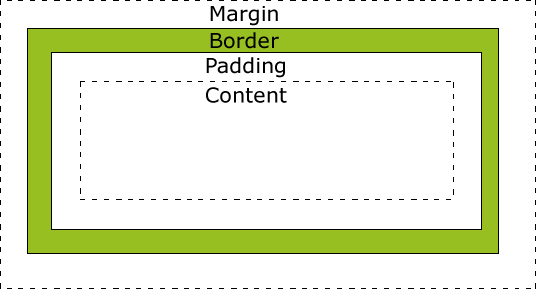
Your course has a section on the "The Box Model" where this will be explained in more detail.
As for pixel sizes, it may help to think of them relative to the font size. But this will also be covered later in the course section on "Understanding Values and Units".
Mark Casavantes
Courses Plus Student 13,401 PointsMark Casavantes
Courses Plus Student 13,401 PointsHi Karen,
The physical size of a pixel depends on how you've set the resolution for the display screen. Basically, it is a dot on the computer screen.
This website will convert inches into pixels for you. https://www.ninjaunits.com/converters/pixels/inches-pixels/
Look at this site for information on understanding margins and paddings. http://www.w3schools.com/css/css_boxmodel.asp
I hope this is helpful.
Happy Coding,
Mark