Welcome to the Treehouse Community
Want to collaborate on code errors? Have bugs you need feedback on? Looking for an extra set of eyes on your latest project? Get support with fellow developers, designers, and programmers of all backgrounds and skill levels here with the Treehouse Community! While you're at it, check out some resources Treehouse students have shared here.
Looking to learn something new?
Treehouse offers a seven day free trial for new students. Get access to thousands of hours of content and join thousands of Treehouse students and alumni in the community today.
Start your free trial

Dylan Merritt
15,682 PointsEclipse seems to be adding in code, and it's causing errors in my app.
I'm taking the Android Development course, and my app was working exactly the way it was supposed to up until about a week ago, when Eclipse seemingly began editing and adding code which caused errors preventing my app from running. Can anyone tell me what might be going on? I really can't continue the course until this stops happening, because every time I open Eclipse there are brand new lines of code with brand new errors that I have to fix. Plus, the code that I add myself will work fine one day, and have errors that I can't fix the next.

Dylan Merritt
15,682 PointsHow do I post images to the comments? I took a screenshot of some of the issues, but can't see an option to upload an image.
14 Answers

Masum Bergmann
Courses Plus Student 4,129 PointsI've noticed a couple of things... In your code you are declaring mCrystalBall for a second time inside the animateCrystalBall() method. You are only permitted to declare a variable once, and since you have done so at the top already remove this line ImageView mCrystalBallImage = (ImageView) findImageViewById(R.id.imageView1); from your animateCrystalBall() method. (try this first)
I can't see the merit of this:
private ImageView findImageViewById(int imageview1) {
        return null;
    }
Try removing it.
I'm a little surprised at how different our imports are. Imports that I should imagine you would need but don't have in you code are:
import android.view.Menu;
import android.view.MenuItem;
import android.view.View;
import android.widget.ImageView;
import com.example.crystalball.R;
try adding these to your code.
Also, where does import javax.swing.text.html.ImageView; come from? Did you add it? This import should not be needed since it's concerned with html <IMG> tags! You can comment this out (by adding // infront of it) and see what happens. Same goes for import java.awt.Menu; which is used in connection with the abstract window toolkit, so not sure what it's doing here...
I'm starting to believe you... a gremlin did go through your code... o.O
Masum Bergmann
Courses Plus Student 4,129 PointsTo upload images, get yourself a photobucket account, upload your images to photobucket, and then follow the sytax for Images in the Markdown Cheatsheet, where the /path/to/img.jpg is simply the URL (http://....) to your images on photobucket.

Randy Perez
5,668 PointsCut and paste your code.
Dylan Merritt
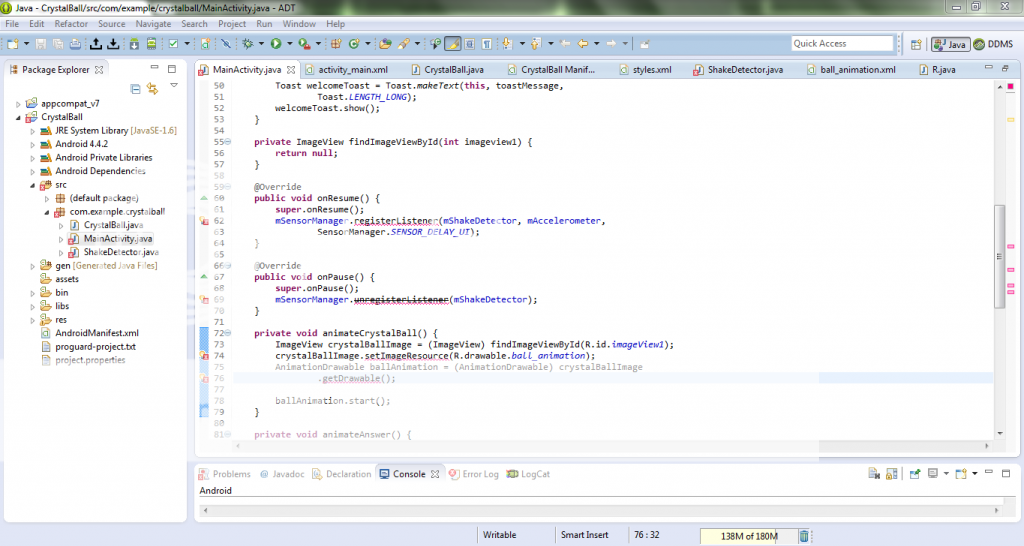
15,682 PointsLet's see if this works.
Masum Bergmann
Courses Plus Student 4,129 PointsOne thing I noticed is that your crystalBallImage variable in the animateCrystalBall() method should perhaps be a member variable (i.e. declared at the top and renamed to mCrystalBallImage). That's not causing the problem though...
What lines were added automatically? Everything I see in your program, I see in mine, so there doesn't seem to be anything extra.
When you hover with your mouse over the errors, what's the displayed error message?
Try organizing Imports by pressing Ctrl + Shift + O, and see if the error messages persist.
Dylan Merritt
15,682 PointsI changed all the necessary variables to mCrystalBallImage, and fixed a couple other things that were causing issues.
I'll assume for now that this is all in my head, and instead focus on fixing the present errors. Here is an updated screenshot:
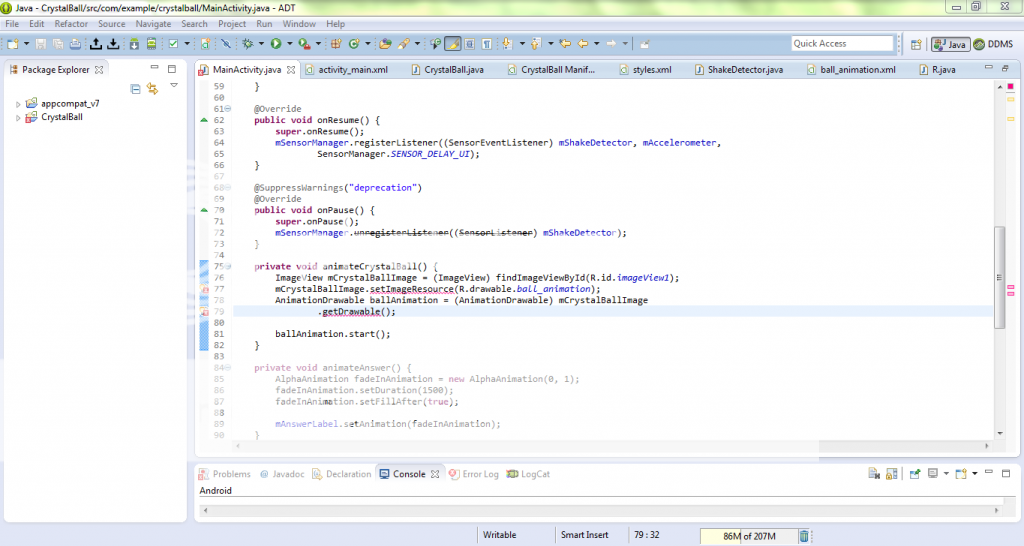
The error on line 77 says, "The method setImageResource(int) is undefined for the type ImageView." The error on line 79 says "The method getDrawable() is undefined for the type ImageView."
Masum Bergmann
Courses Plus Student 4,129 PointsI can see from your scroll bar that you have two warnings (yellow blocks) at the top of your code... could you please tell me what they are/ what they say. Just hover with your cursor over the yellow undlined code.
Dylan Merritt
15,682 PointsThe first says that the type SensorListener is deprecated. The second says that the value of the MainActivity.mCrystalBallImage is not used, although you can see from the screenshot that it is used multiple times.
Masum Bergmann
Courses Plus Student 4,129 PointsOk, we're on the right track... what you can do to double check that you haven't misspelled anything, is double click mCrystalBallImage that is underlined in yellow. Right to the scroll bar you will see indicators where that name is used in the code, and withing the code the name would be highlighted. If there are no indicators... double check the spelling, or copy and paste the name to make sure it's the same everywhere...
You should have the following lines of code that include mCrystallBallImage
private ImageView mCrystalBallImage;
Within the MainActivity class at the very top.
mCrystalBallImage = (ImageView) findViewById(R.id.imageView1);
Within the onCreate() method right after setContentView() is called.
mCrystalBallImage.setImageResource(R.drawable.ball_animation);
First line of the animateCrystalBall() method.
AnimationDrawable ballAnimation = (AnimationDrawable) mCrystalBallImage.getDrawable();
Second line of the animateCrystalBall() method.
If this does not resolve the issue, please copy and paste the entire contents of your MainActivity.java into http://www.codesend.com/ and send me the link... Good Luck!
Dylan Merritt
15,682 PointsI did all of that and nothing changed. Here is the link to the code.
http://www.codesend.com/view/1b654188412ca841f45b4433ac0380c1/
Dylan Merritt
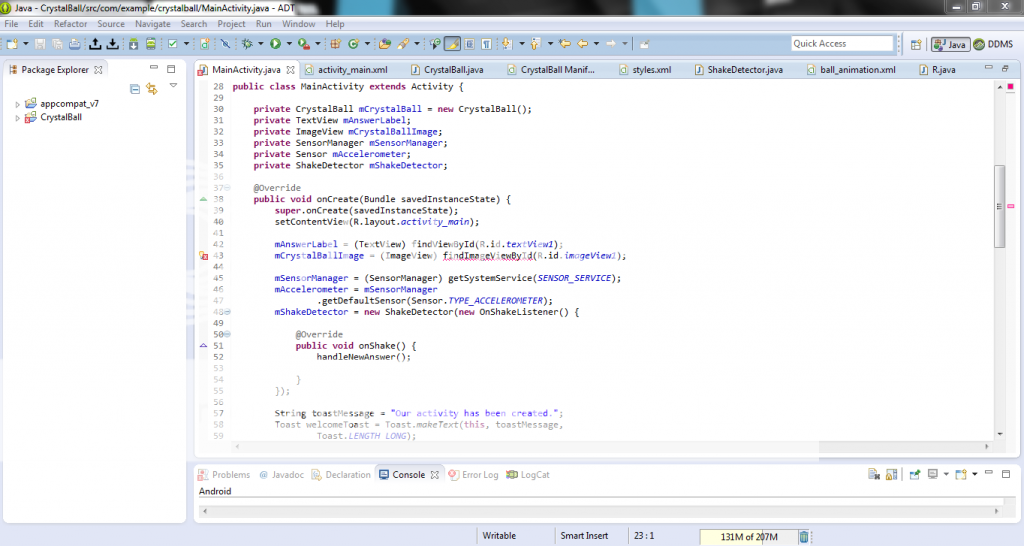
15,682 PointsI fixed everything that you suggested (and for the record do not remember adding the vast majority of it), and fixing those things fixed all the previous errors and added this one:
Dylan Merritt
15,682 PointsFixed it! Thank you so much for all your help. I can't tell you how much I appreciate it. If I run into any more trouble, I'll know who to come to. Thanks again friend!
Masum Bergmann
Courses Plus Student 4,129 PointsFantastic!! :D I'm glad I was able to help... Have a great day!
Dylan Merritt
15,682 PointsBack again. I'm at the point of sharing my app via email, but my workspace folder is empty. Any idea why that might be or what I could do to fix it?
Masum Bergmann
Courses Plus Student 4,129 PointsChances are you've been saving your work in a different folder. Perhaps during eclipse setup you simply chose a different default folder, but not to worry it's quite easy to figure out where your project is...
Inside Eclipse, in the Package Explorer, right click on your project folder, then select Properties. Select Resource if it's not yet selected, and simply look at where is says Location: on the right. There you will see the path of where your project is saved...
Masum Bergmann
Courses Plus Student 4,129 PointsMasum Bergmann
Courses Plus Student 4,129 PointsHi Dylan, what code exactly was added, and to what file, and where in the file? This should help track down your code-churning gremlin!