Welcome to the Treehouse Community
Want to collaborate on code errors? Have bugs you need feedback on? Looking for an extra set of eyes on your latest project? Get support with fellow developers, designers, and programmers of all backgrounds and skill levels here with the Treehouse Community! While you're at it, check out some resources Treehouse students have shared here.
Looking to learn something new?
Treehouse offers a seven day free trial for new students. Get access to thousands of hours of content and join thousands of Treehouse students and alumni in the community today.
Start your free trial

Krystel Hagan
4,731 PointsHelp!
Q: Select the unordered list with the class contact-info and set the font size to 0.9em. Then, remove all margin, padding, and list styling.
A:
.contact-info ul { font-size: 0.9em; margin: 0; padding: 0; list-style: none; }
I am not sure what I am doing wrong, it says to make sure my font size is set to 0.9em
7 Answers

Hasan Pektas
2,128 PointsI think you must select the unordered list with the class ".contact-info". You have selected all unordered lists in ".contact-info" using ".contact-info ul".
Correct should be:
ul.contact-info {
font-size: 0.9em;
margin: 0;
padding: 0;
list-style: none;
}

dan schmidt
2,576 PointsYou can just use .contact-info
What your selector is doing is applying that styling to any unordered-list element that is inside (and therefore a descendant of) the .contact-info unordered list element. You want to apply those directly to the .contact-info unordered list.

Ricardo Hill-Henry
38,443 PointsYou wouldn't want to just use .contact-info, due to specificity.

dan schmidt
2,576 PointsOk, but I would then ask what exactly do we gain by specifically targeting element.class_name vs .class_name when we take into consideration the context of that particular class's styling? The styling is particular to lists and as such would only make sense being applied to list elements. If there are multiple unordered list elements with the class attached to them, the specificity has no discernible effect from just targeting the class name.
Now, I understand that the value of classes relative to id's is that we can apply them to multiple elements, so some could claim that if we do not specifically target the element that the class is attached to, we could be applying styling to some elements we do not wish to who are also carrying this class. But if that is the problem we are facing, given that the class's purpose is to style ulelements, why are we attaching this class to those elements in the first place? If the problem we are facing is that we are simply trying to target a singleul` from all other elements, then we should be using an id rather than a class.
Hasan Pektas
2,128 PointsIn some cases, you might want the same class name and some specifications from it in another tag. For example if we had some divs we want to call contact-info and we want to keep the font but change the padding and margin (the list-style is irrelevant to the div).
Then we would have:
.contact-info {
  font-size: 0.9em;
}
ul.contact-info {
padding: 0;
margin: 0;
list-style:none;
}
div.contact-info {
padding: 10px;
margin: 15px 10px 15px 10px;
}
What we get is a well structured CSS were we don't need to specify every style more than enough. We also don't need to specify another class name called contact-info-for-divs etc.
Note: There is wrong having a unique class name for each tag. I'm just trying to explain the cons.
Ricardo Hill-Henry
38,443 PointsClasses are meant to share properties amongst different elements.
In a situation we could assume .contact-information has already been established, and given some basic formatting:
.contact-information{
color: tomato;
font-size: 200px;
list-style-type: none;
margin: 0 auto;
padding: 10px;
}
I can then use this as a template for creating my specific ul with a class .contact-information
ul.contact-information{
font-size: 100px;
border: 10px solid;
.. and so on
}
If I understand correctly, your way of thinking about it will work; but with more code, and repetitive styling. The style ul.contact-information will inherit all properties from .contact-information, while also being able to modify or add on styles specificly for the ul. This helps if we later want to use .contact-information to style something else.
dan schmidt
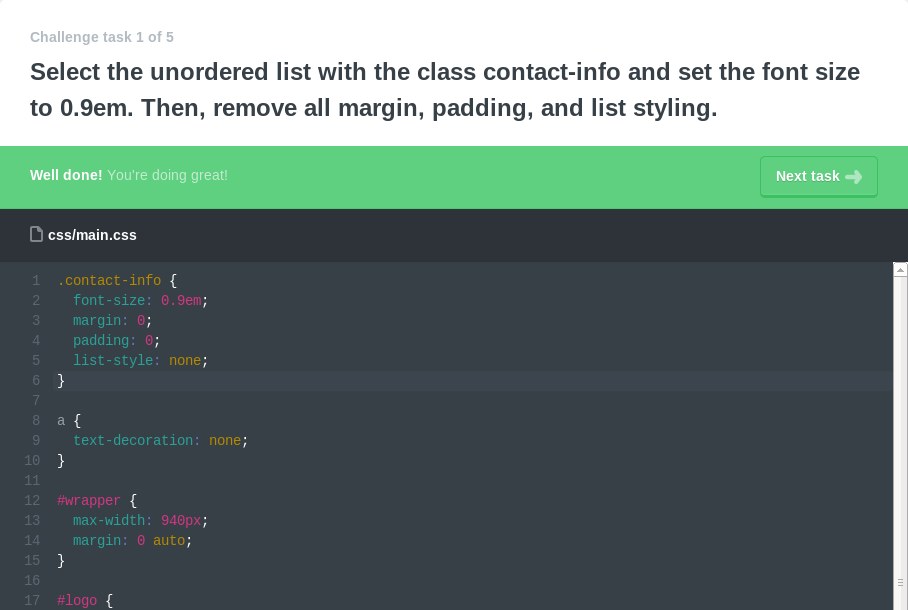
2,576 PointsJust for funsies, I've grabbed a snapshot proving I'm right :P

Hasan Pektas
2,128 PointsI'd try same ting and I still got an error, weird. But that's just a task in real life project: the example above is mostly the way to go.
Krystel Hagan
4,731 Pointshttp://teamtreehouse.com/library/add-and-style-icons
Here is the URL to the question
Hasan Pektas
2,128 PointsThis is either a bug or description error.
dan schmidt
2,576 PointsThe confusion is actually explainable, in the video for that project, they chose to use a class instead of an id simply so that the learner could be exposed to the css syntax. The scope of the project is so small that you would probably elect to use an id instead under normal circumstances.
dan schmidt
2,576 PointsJust for funsies, here's a snapshot proving I'm right :P
Ricardo Hill-Henry
38,443 PointsNo one said it wouldn't work.. I tried both methods, and they work fine...
Ricardo Hill-Henry
38,443 PointsChange "list-style" to list-style-type
I tried:
.contact-info{
font-size: 0.9em;
  margin: 0;
  padding: 0;
  list-style-type: none;
}
and
ul.contact-info{
font-size: 0.9em;
  margin: 0;
  padding: 0;
  list-style-type: none;
}
both seem, to work fine.. I'm assuming it might be a bug you're experiencing?

Roland Cedo
21,261 PointsYeah I see all the confusion. Check it out:
HTML: *notice how the UL is nested under the Section named "secondary"
<section id="secondary">
   <h3>Details</h3>
     <ul class="contact-info">```

With that being said, you will be targeting this on individual UL just by selecting it's class.

```css
.contact-info {
font-size: 0.9em;
  margin: 0;
  padding: 0;
  list-style-type: none;
} ```

The way you originally had it was targetting and entire set of UL's that is nested class name of "Contact Info" which doesn't exist in the code.

I can see the confusion though, it didn't give the typical tab to view the HTML source.

Makes sense?

Roland Cedo
21,261 PointsSorry for the poorly formatted Mark Down. Obviously still a goofball with that >_>
Roland Cedo
21,261 PointsRoland Cedo
21,261 PointsCan you post the URL to the code challenge? I'd like to check it out