Welcome to the Treehouse Community
Want to collaborate on code errors? Have bugs you need feedback on? Looking for an extra set of eyes on your latest project? Get support with fellow developers, designers, and programmers of all backgrounds and skill levels here with the Treehouse Community! While you're at it, check out some resources Treehouse students have shared here.
Looking to learn something new?
Treehouse offers a seven day free trial for new students. Get access to thousands of hours of content and join thousands of Treehouse students and alumni in the community today.
Start your free trial

James Hollingworth
3,662 Pointshorizontally align a nav with a logo in the middle
Hi
Can anyone kindly help me. I am trying to horizontally align a nav with my logo in the middle rather than having the links aligned with the bottom of the logo. Can anyone know what I need to do. I have played with padding etc but as I am display: inline; not much seems to work. Any suggestions?
This is a link to my experimentation http://www.jameshollingworth.com/demo.html
thanks
4 Answers

Chase Lee
29,275 PointsTry putting a negative margin/padding.

Kevin Korte
28,149 PointsTo not change the structure you have, I added this CSS:
li a {
bottom: 25px;
position: relative;
}
Which gave me this result:
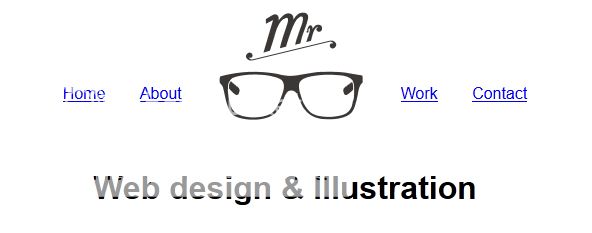
Word of caution, if you decide to make your logo an anchor, my method will no longer work, and you'll need a new way to select the links in CSS. A simple way might be adding a common class to the anchor links, and using that anchor to select them,and not the logo anchor.
James Hollingworth
3,662 PointsAwersome work guys. I tried negative values no luck but Kevins code has worked a treat. I am definitely not going to make my logo an anchor.
Thank you very much Evans, Chase and Kevin

J.T. Gralka
20,126 PointsTry checking out this forum post from earlier this week; it might help you out a little.
Evans B. Ofori
Courses Plus Student 13,720 PointsEvans B. Ofori
Courses Plus Student 13,720 PointsHello James! Try this and play around
header nav li .logo { margin-bottom: -50px; width: 150px; }