Welcome to the Treehouse Community
Want to collaborate on code errors? Have bugs you need feedback on? Looking for an extra set of eyes on your latest project? Get support with fellow developers, designers, and programmers of all backgrounds and skill levels here with the Treehouse Community! While you're at it, check out some resources Treehouse students have shared here.
Looking to learn something new?
Treehouse offers a seven day free trial for new students. Get access to thousands of hours of content and join thousands of Treehouse students and alumni in the community today.
Start your free trial

Meenakshi Bohra
1,182 Pointshow to download project files
how to download project file associated with the video
2 Answers

William Li
Courses Plus Student 26,868 PointsHi, Meenakshi Bohra , Welcome to Treehouse. Project files are in the Downloads tab underneaths the Lecture video.
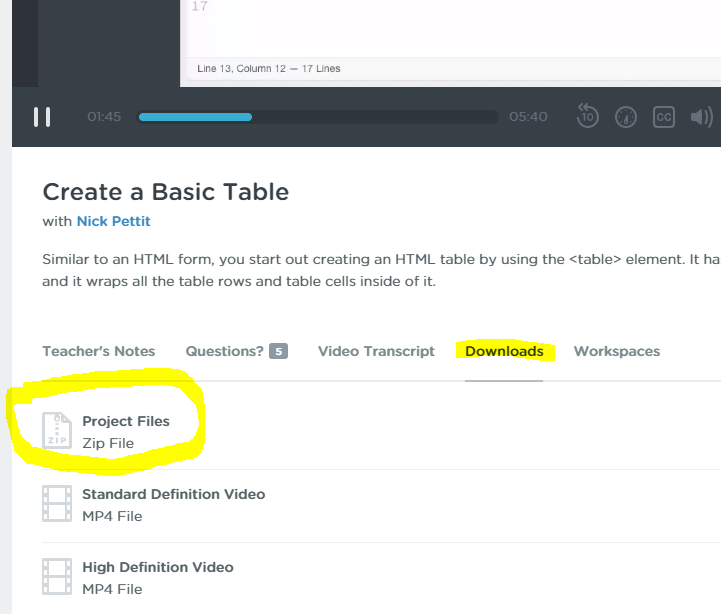
Not all Videos have associated Project files, but most of them do.
Meenakshi Bohra
1,182 Pointsthank you so much
Meenakshi Bohra
1,182 Pointsand how to unzip it???

Jay Padzensky
4,731 PointsHi Meenakshi,
Here's how to unzip files according to MS Windows 7:
Locate the compressed folder that you want to extract files or folders from.
Do one of the following:
To extract a single file or folder, double-click the compressed folder to open it. Then, drag the file or folder from the compressed folder to a new location.
To extract the entire contents of the compressed folder, right-click the folder, click Extract All, and then follow the instructions.
http://windows.microsoft.com/en-us/windows/compress-uncompress-files-zip-files#1TC=windows-7
Meenakshi Bohra
1,182 PointsMeenakshi Bohra
1,182 Pointshow to unzip a file