Welcome to the Treehouse Community
Want to collaborate on code errors? Have bugs you need feedback on? Looking for an extra set of eyes on your latest project? Get support with fellow developers, designers, and programmers of all backgrounds and skill levels here with the Treehouse Community! While you're at it, check out some resources Treehouse students have shared here.
Looking to learn something new?
Treehouse offers a seven day free trial for new students. Get access to thousands of hours of content and join thousands of Treehouse students and alumni in the community today.
Start your free trial

Nehemiah Reese
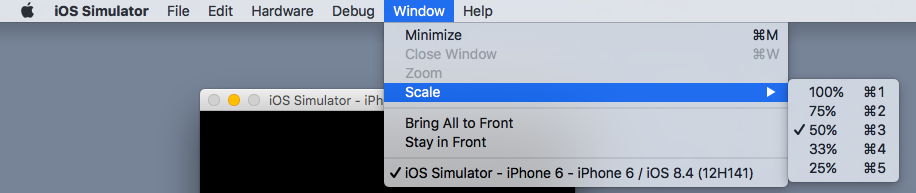
17,692 PointsHow to resize my ios simulator? Its running to big and need to size it down to fit my Mac on an IPhone simulator screen.
Xcode

Marcos H
497 PointsYou can click and drag from any corner to resize.
1 Answer

Ulises Vazquez
4,042 PointsUnfortunately you can't. You have to chose their predefined sizes
Marcos H
497 PointsI can on mine. Must be the version. Sorry
Ulises Vazquez
4,042 PointsUlises Vazquez
4,042 PointsGo to Window > Scale (choose the % thats good for your monitor)