Welcome to the Treehouse Community
Want to collaborate on code errors? Have bugs you need feedback on? Looking for an extra set of eyes on your latest project? Get support with fellow developers, designers, and programmers of all backgrounds and skill levels here with the Treehouse Community! While you're at it, check out some resources Treehouse students have shared here.
Looking to learn something new?
Treehouse offers a seven day free trial for new students. Get access to thousands of hours of content and join thousands of Treehouse students and alumni in the community today.
Start your free trial

john campbell
Front End Web Development Techdegree Student 2,657 PointsHTML validation errors
Hey, had a few errors come up when validating my code and I'm not sure why... can anyone help?
Error 1: Line 7, Column 139: Bad value http://fonts.googleapis.com/cssfamily=Changa+One|Open+Sans:400italic,700italic,400,700,800 for attribute href on element link: Illegal character in path segment: not a URL code point. …ne|Open+Sans:400italic,700italic,400,700,800' rel='stylesheet' type='text/css'> Syntax of URL: Any URL. For example: /hello, #canvas, or http://example.org/. Characters should be represented in NFC and spaces should be escaped as %20.
Error 2: Line 27, Column 13: Section lacks heading. Consider using h2-h6 elements to add identifying headings to all sections. <section>
Here's my code.
<!DOCTYPE html>
<html>
<head>
<meta charset="utf-8">
<title>John Campbell | Designer</title>
<link rel="stylesheet" href="css/normalize.css">
<link href='http://fonts.googleapis.com/css?family=Changa+One|Open+Sans:400italic,700italic,400,700,800' rel='stylesheet' type='text/css'>
<link rel="stylesheet" href="css/main.css">
<link rel="stylesheet" href="css/responsive.css">
<meta name="viewport" content="width=device-width, initial-scale=1.0">
</head>
<body>
<header>
<a href="index.html" id="logo">
<h1>John Campbell</h1>
<h2>Designer and Digital Recruiter</h2>
</a>
<nav>
<ul>
<li><a href="index.html" class="selected">Portfolio</a></li>
<li><a href="about.html">About</a></li>
<li><a href="contact.html">Contact</a></li>
</ul>
</nav>
</header>
<div id="wrapper">
<section>
<ul id="gallery">
<li>
<a href="img/numbers-01.jpg">
<img src="img/numbers-01.jpg" alt="">
<p>Experiment.</p>
</a>
</li>
<li>
<a href="img/numbers-02.jpg">
<img src="img/numbers-02.jpg" alt="">
<p>Experimenting.</p>
</a>
</li>
<li>
<a href="img/numbers-06.jpg">
<img src="img/numbers-06.jpg" alt="">
<p>This is funny.</p>
</a>
</li>
<li>
<a href="img/numbers-09.jpg">
<img src="img/numbers-09.jpg" alt="">
<p>Hi Eunika.</p>
</a>
</li>
<li>
<a href="img/numbers-12.jpg">
<img src="img/numbers-12.jpg" alt="">
<p>Penguins.</p>
</a>
</li>
</ul>
</section>
<footer>
<a href="http://twitter.com/impactc_digital"><img src="img/twitter-wrap.png" alt="Twitter Logo" class="social-icon"></a>
<a href="http://facebook.com/john.campbell.50596013"><img src="img/facebook-wrap.png" alt="Facebook Logo" class="social-icon"></a>
<p>© 2014 John Campbell.</p>
</footer>
</div>
</body>
</html>
7 Answers

Colin Bell
29,679 PointsFor Error 1 - If you url encode the bar character (The | between One and Open), it should fix the problem. The url encode for it is %7
                                                        <!-- v right here -->
<link href='http://fonts.googleapis.com/css?family=Changa+One%7CPTOpen+Sans:400,700,800,400italic,600italic,700italic' rel='stylesheet' type='text/css'>
For Error 2 - From w3.org: The theme of each section should be identified, typically by including a heading (h1-h6 element) as a child of the section element.
<section>
    <h2>Experiment heading</h2> <!-- What it's asking you to add -->
    <ul>
        ...
    </ul>
</section>

Wayne Priestley
19,579 PointsHey John,
Could you post all your html and css please.
Here is a link to explain how to use Markdown to post your code How to post code
If you look at the bottom of the box when your typing a reply you will see Markdown Cheatsheet that will also explain how to post your code.
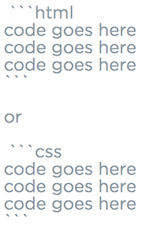
You have to make sure you have a bit of space under your last line of text in your post. Then you add three back ticks followed by html or css depending on the type of code your inserting.
Then straight after your last line of code you add another three back ticks.
Remember to leave at least a few lines between any text at the top or bottom of your code.
Hope this helps.
john campbell
Front End Web Development Techdegree Student 2,657 PointsThank you - I have edited and hopefully you can see my code correctly now.
Wayne Priestley
19,579 PointsHey John,
We need all your code to test it, looking at what you've pasted i see no closing tag for ul or li or a tag. I also don't know any line numbers or columns.
john campbell
Front End Web Development Techdegree Student 2,657 PointsOK great thank you, really appreciate the advice - hope it now reads fine :)
Wayne Priestley
19,579 PointsHey John,
I've spent an hour looking at this, the problem definitely lies with the Google font link, I would suggest copying the link again or maybe trying a different font as i can't figure out the problem, I use Google fonts all the time and have never had this issue.
Sorry.
john campbell
Front End Web Development Techdegree Student 2,657 PointsThanks guys I will try your suggestions :)