Welcome to the Treehouse Community
Want to collaborate on code errors? Have bugs you need feedback on? Looking for an extra set of eyes on your latest project? Get support with fellow developers, designers, and programmers of all backgrounds and skill levels here with the Treehouse Community! While you're at it, check out some resources Treehouse students have shared here.
Looking to learn something new?
Treehouse offers a seven day free trial for new students. Get access to thousands of hours of content and join thousands of Treehouse students and alumni in the community today.
Start your free trial

Lisa Crowley
4,793 PointsLine items in a list highlight to the height of the UL on click - is this built into the browser?
I'm working together with a team on making a dropdown navigation. I'm not as familiar with the Javascript, but it looks kind of like this:
<ul>
    <li onclick="toggleMenu(this);">
        Main Nav Link
        <div>
            <ul>
                <li>Option 1</li>
                <li>Option 2</li>
                <li>Option 3</li>
            </ul>
        </div>
    </li>
</ul>
However, when you click twice on the Main Nav Link line item, it highlights/selects the entire line item up to the height of the containing UL.
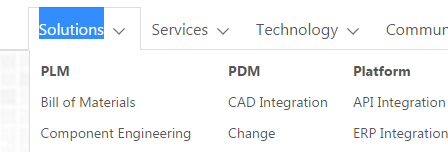
Is this from the user agent stylesheet?
1 Answer

Erwin Meesters
15,088 PointsYes, it's a browser thing. You can prevent this (in some browsers) by putting these rules in your css:
* {
  -webkit-user-select: none; /* Chrome/Safari */
  -moz-user-select: none; /* Firefox */
  -ms-user-select: none; /* IE10+ */
}
The asterisk targets all elements, you don't have to do this, you can target any element. There are different solutions, something like:
* {
  -webkit-tap-highlight-color: transparent;
}
Lisa Crowley
4,793 PointsLisa Crowley
4,793 PointsThe first solution you proposed was perfect! I targeted my nav specifically and it did exactly the trick. Thank you so much!