Welcome to the Treehouse Community
Want to collaborate on code errors? Have bugs you need feedback on? Looking for an extra set of eyes on your latest project? Get support with fellow developers, designers, and programmers of all backgrounds and skill levels here with the Treehouse Community! While you're at it, check out some resources Treehouse students have shared here.
Looking to learn something new?
Treehouse offers a seven day free trial for new students. Get access to thousands of hours of content and join thousands of Treehouse students and alumni in the community today.
Start your free trial

Matthew Waller
1,698 PointsNo identities were available
So I'm trying to validate an app for the purpose of beta testing, but when I try to validate an archive, it tells me:
"No identities are available for signing"
And when I hit the "Download Identities" button and choose from my development team, it says:
"No identities were available/ An administrator must request identities before they can be downloaded."
I've revoked my certificates and made them again, and I've deleted the provisioning profiles and made them all again for ad hoc distribution and development (I also deleted all the provisioning profiles from my keychain).
I made sure that my bundle identifier matches the app in iTunes Connect and the distribution provisioning profiles I've created from the iOS Dev Center. The bundle identifiers match.
Everything shows up under my "Accounts" under "Preferences" in XCode. The accounts shows that I have valid certificates and provisioning profiles.
I also made sure that the correct distribution provisioning profile was selected under "Code Signing" in the Build Settings.
Any other ideas about what I could do, or what the problem might be?
What do you guys think @Amit and @Bendog24 ?
The app runs great on my phone, and I'm excited to share it with others.
5 Answers

Amit Bijlani
Treehouse Guest TeacherHere's a list of things you need to verify:
Do you have an App ID (Bundle ID + Product Name) that matches an App ID within the Identifiers in the Provisioning Portal. App ID's are case-sensitive so that is one thing to watch out for.
Have you created a Provisioning Profile with that App ID.
Make sure you have the right provisioning profile installed locally.
Matthew Waller
1,698 PointsSo I here is the name of the app and the App ID as it appears on my app record (which is in the "Waiting for upload" status)

Amit Bijlani
Treehouse Guest TeacherYou might want to upload it to a third-party service like Imgur.com and then link it here using markdown.
Markdown for images:

Matthew Waller
1,698 PointsSo I here is the name of the app and the App ID as it appears on my app record (which is in the "Waiting for upload" status)
Matthew Waller
1,698 PointsSo I here is the name of the app and the App ID as it appears on my app record (which is in the "Waiting for upload" status)

Matthew Waller
1,698 PointsSo I here is the name of the app and the App ID as it appears on my app record (which is in the "Waiting for upload" status)
[alt text](file://localhost/Users/matthewwaller/Desktop/Screenshots/iTunesConnect.png)
Matthew Waller
1,698 PointsMatthew Waller
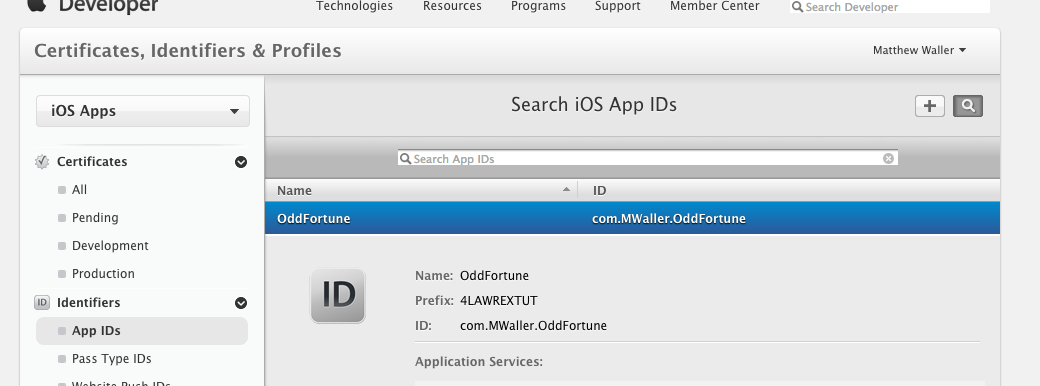
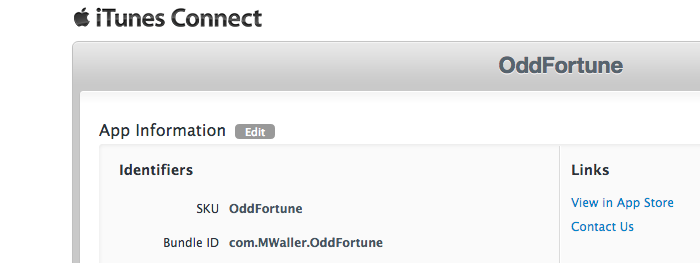
1,698 PointsI've been trying to figure out how to add images thru markdown from my Mac desktop to show screenshots of the App IDs from iTunesConnect and the provisioning portal, but I haven't figured that out yet as you can see. I've double checked everything, and it seems that the App ID s all match in iTunesConnect, the identifiers and the provisioning profile all match (they are all com.MWaller.OddFortune), case sensitive and all.
Can't find where I'm going wrong.
Matthew Waller
1,698 PointsMatthew Waller
1,698 PointsThanks for the imgur tip! Here is what I have for my App ID's in iTunesConnect and my provisioning portal: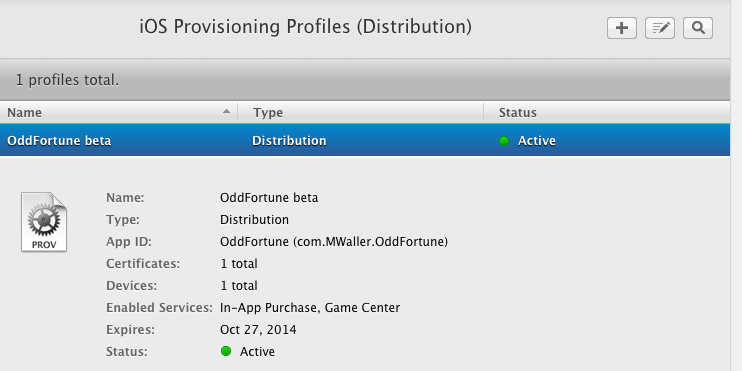
Amit Bijlani
Treehouse Guest TeacherAmit Bijlani
Treehouse Guest TeacherAre you still seeing the exact same error? Not sure if you have seen this StackOverflow article regarding this error: http://stackoverflow.com/questions/10215530/no-identities-were-available-administrator-request
Matthew Waller
1,698 PointsMatthew Waller
1,698 PointsYep, I tried that one. I've been getting the exact same error. Curious thing though, in step 5 of the check marked response it says: "Back to XCode Organizer - Devices. Click TEAM (Left sidebar) and click "Refresh" (right-bottom). You will find XCode fetch the new profile." But I have no "TEAM (Left sidebar)". I had to get the new profile by downloading it from the provisioning portal and then clicking on the downloaded file. Then the profile showed up in the device. I selected "Add" where you can choose the team from the member center, as well, hoping that would give me the "TEAM (left sidebar)" but it didn't. It just gave me a list of the provisioning profiles I already had.
Amit Bijlani
Treehouse Guest TeacherAmit Bijlani
Treehouse Guest TeacherI don't think it has anything to do with the team. You can have a company or individual account so if you have an individual account then you might not have a link to the team. What does your project setup look like? Select the project within Xcode and then on the right under Build Settings check under Code Signing Identity. Make sure you have the correct provisioning profile selected.
Matthew Waller
1,698 PointsMatthew Waller
1,698 PointsSo here is the code signing section, with the new beta provisioning profile (specified for ad hoc) selected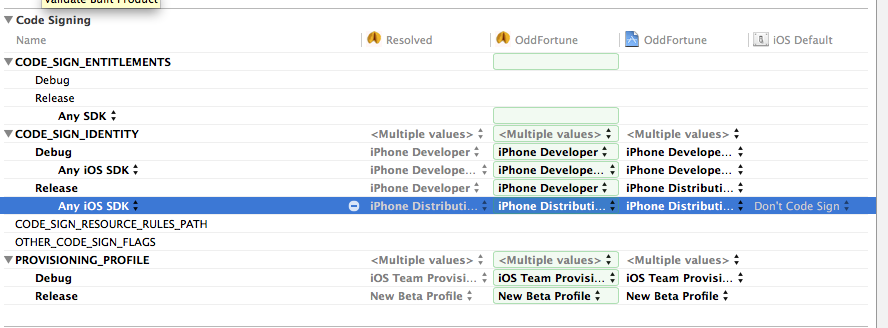
Amit Bijlani
Treehouse Guest TeacherAmit Bijlani
Treehouse Guest TeacherWhen you click on it, you get a drop-down. I would select a specific provisioning profile in case you have multiple.
Matthew Waller
1,698 PointsMatthew Waller
1,698 PointsYou mean like this? The "New Beta Profile" is the specific provisioning profile I'm trying to select.
Amit Bijlani
Treehouse Guest TeacherAmit Bijlani
Treehouse Guest TeacherSorry, I meant to refer to the CODE_SIGN_IDENTITY. When you click on that do you see your specific certificate? If you do, then select it. If you don't then you probably did not select the certificate when you created the provisioning profile.
Matthew Waller
1,698 PointsMatthew Waller
1,698 PointsHere is what the drop down looks like: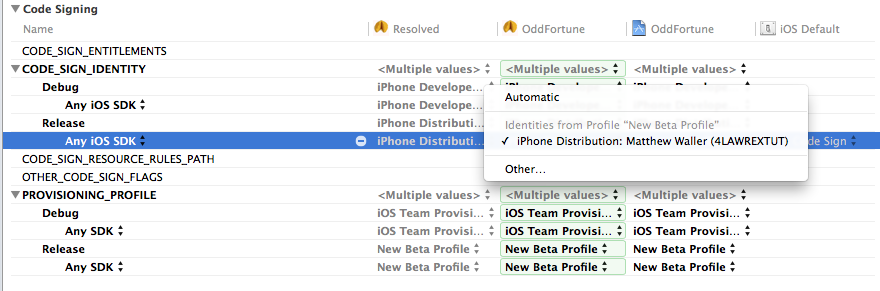
And I'm selecting the only identity available. Curious, eh?
Amit Bijlani
Treehouse Guest TeacherAmit Bijlani
Treehouse Guest TeacherCheck out this link and see if you have a similar issue.
Matthew Waller
1,698 PointsMatthew Waller
1,698 PointsIt looks like this person had trouble transferring the private key from another machine. I'm doing all my work on one machine, and the keys are with the certificates in the keychain access.
So strange. I'm beginning to wonder if this is not a bug. Before I upgraded to the latest XCode, the one after XCode 5, the 5.01, the program just crashed on me entirely when I tried to download identities. Now it just tells me I need an administrator to download the identities.
I tried deleting and reinstalling XCode, no luck. Also built my app from scratch (thankfully, it's a simple app). No luck. Anyway, I'll pester Apple a bit with my technical help request. As well.
Matthew Waller
1,698 PointsMatthew Waller
1,698 PointsWell @Amit I was able to validate, but only using an app store provisioning profile. Wasn't able to validate at all with an ad hoc provisioning profile. Maybe it's just a bug that will get fixed. I'm curious to know whether y'all are able to validate an app with an ad hoc provisioning profile on your machines. Thanks again for all your help.
I'm going to skip the ad hoc validation, see if I can beta test the app on some other machines, and then finally submit to the app store.
Amit Bijlani
Treehouse Guest TeacherAmit Bijlani
Treehouse Guest TeacherI haven't done an ad-hoc installation since the update so I guess I will find out when I do one.