Welcome to the Treehouse Community
Want to collaborate on code errors? Have bugs you need feedback on? Looking for an extra set of eyes on your latest project? Get support with fellow developers, designers, and programmers of all backgrounds and skill levels here with the Treehouse Community! While you're at it, check out some resources Treehouse students have shared here.
Looking to learn something new?
Treehouse offers a seven day free trial for new students. Get access to thousands of hours of content and join thousands of Treehouse students and alumni in the community today.
Start your free trial

Brian Hayes
20,986 PointsOverlay Blend Mode in Illustrator mimicked in SASS
In the logo creation course there was a method for building a color scheme with one color filled rectangle and then to get lighter values using white rectangles on top that have different opacity settings and a blend mode of Overlay.
Now I went ahead and did this method thinking i could just have my base colors be the main variable in my Sass file and then use Sass and Compass functions to get the different shades/blends of the base color.
here is an example of what i did in illustrator:
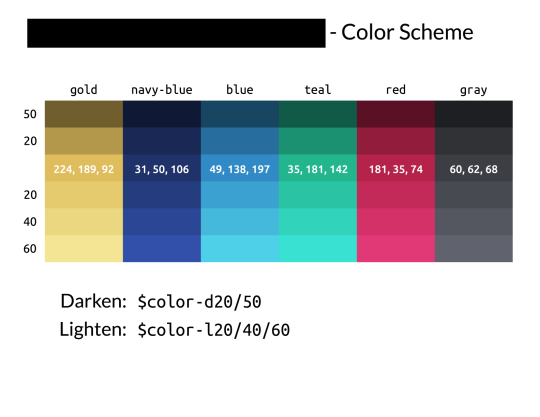
this was intended to be a sort of cheatsheet for myself while coding.
My problem now is that i can't find a Sass or Compass color function that can achieve the lighter versions of the base color. These are the ones using a white rectangle on top with 20, 40, and 60 percent opacities set on the overlay blend mode. From what i can tell the overlay blend mode mostly affects contrast, however i could be wrong.
What i can't figure out is what, if anything, in SASS can get the same color result as i get in illustrator when using the overlay blend mode.