Welcome to the Treehouse Community
Want to collaborate on code errors? Have bugs you need feedback on? Looking for an extra set of eyes on your latest project? Get support with fellow developers, designers, and programmers of all backgrounds and skill levels here with the Treehouse Community! While you're at it, check out some resources Treehouse students have shared here.
Looking to learn something new?
Treehouse offers a seven day free trial for new students. Get access to thousands of hours of content and join thousands of Treehouse students and alumni in the community today.
Start your free trial

Shantanu Raj
14,900 PointsProblems with Parse.com Android Workshop
I'm having trouble in executing the sample files both the start and final versions, as soon as they are built and run they force close.
I have added my own keys to the final so I am not able discern what the problem is.

Ernest Grzybowski
Treehouse Project ReviewerPlease post some of your code, and some of the error logs. You wouldn't show up to a car mechanic without your car would you!?

Shantanu Raj
14,900 PointsCode from the ParseWorkshopApplication.java file
package com.teamtreehouse.parseworkshop;
import android.app.Application;
import com.parse.Parse; import com.parse.ParseACL; import com.parse.ParseUser;
public class ParseWorkshopApplication extends Application {
    @Override
    public void onCreate() {
        super.onCreate();
        Parse.initialize(this, stuff,   otherstuff);
        ParseACL defaultACL = new ParseACL();
        // If you would like all objects to be private by default, remove this
        // line.
        defaultACL.setPublicReadAccess(true);
        ParseACL.setDefaultACL(defaultACL, true);
    }
}
Well the final zip imports the parseUser but never uses it in the final build.
Here's the logcat
1 Answer

Ben Jakuben
Treehouse TeacherReally sorry about that! Somehow in saving my project files, the option to include the Parse JAR file became unchecked. I will fix that and upload a new version shortly.
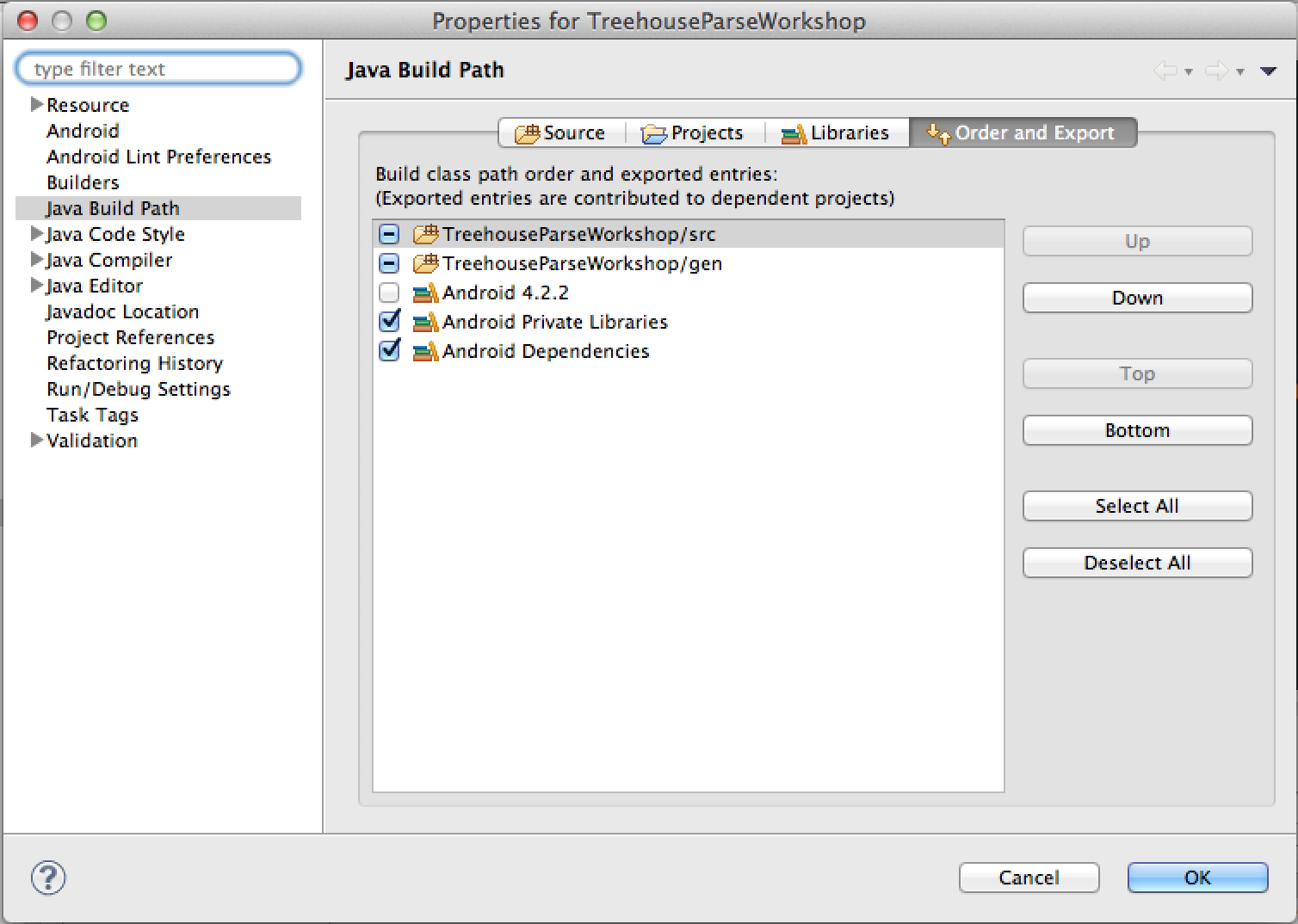
In the mean time, you can fix it yourself by right-clicking on the TreehouseParseWorkshop project and select Build Path > Configure Build Path. In the Order and Export tab on the far right, make sure the "Android Private Libraries" box is checked (which will include the Parse JARs and other JARs in the libs directory). You may also need to clean and rebuild your project once you make this change.
Here is what that screen should look like:
James Barnett
39,199 PointsJames Barnett
39,199 PointsIt's kinda hard to provide any advice without seeing some code.