Welcome to the Treehouse Community
Want to collaborate on code errors? Have bugs you need feedback on? Looking for an extra set of eyes on your latest project? Get support with fellow developers, designers, and programmers of all backgrounds and skill levels here with the Treehouse Community! While you're at it, check out some resources Treehouse students have shared here.
Looking to learn something new?
Treehouse offers a seven day free trial for new students. Get access to thousands of hours of content and join thousands of Treehouse students and alumni in the community today.
Start your free trial

Adnan Hasbi
4,544 PointsRunning an App on a Device
Hello,
Almost trying the app on my phone but ... I cannot see it in the DDMS list. Also I following the steps by clicking the Console - Android After that I clicked start x5 but it does not prompt me to choose a device Please help ..
I am currently using a PC and a S3 Phone
10 Answers

Ben Jakuben
Treehouse Teacher@Adnan, do you have the DDMS Perspective available in the upper right of Eclipse, like this?
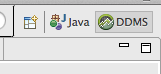
If it's not there, you can click the little "plus" icon and select DDMS from the menu.
In the DDMS Perspective, there is a "Devices" view on the left. Does your S3 show up in there when it's connected? If not, try this StackOverflow question for tips on how to connect your S3 using Windows: http://stackoverflow.com/questions/10929386/hardware-debugging-using-samsung-galaxy-s3-in-windows
Adnan Hasbi
4,544 PointsThanks for the reply. I am now doing the upload on google play part of the tutorial. So I figured publishing the app and tweaking it once published. Unconventional but it is a trail and error for me now ;)
Ben Jakuben
Treehouse TeacherUnconventional is good as long as it helps you learn!

Adnan Hasbi
4,544 PointsHi Ben,
I tried uploading the app today ... Excited as it is launch day but it crashed , please help my address is
Thanks
Ben Jakuben
Treehouse TeacherI installed your app, hooked up my phone to my computer, and watched Logcat in Eclipse as I opened your app. Here's the error I saw in Logcat:
java.lang.RuntimeException: Unable to instantiate activity ComponentInfo{com.adhastudio.crystalball/com.adhastudio.crystalball.MainActivityity}: java.lang.ClassNotFoundException: Didn't find class "com.adhastudio.crystalball.MainActivityity" on path: /data/app/com.adhastudio.crystalball-1.apk
The name and package of MainActivity don't look right. This comes from your AndroidManifest.xml file. Open up that file and look at it in XML mode. Check the name and path for the MainActivity <activity> element. Could it be the extra "ity" at the end of MainActivity*ity*?
Adnan Hasbi
4,544 PointsYup what you said happened exactly
However now I am trying to upload the file on Google Play but it is stopping me to do so.
Apparently I need to change the uploaded apk to version 2 , how do I do it ?
Thanks Ben in advance
PS excited now, even though i see 10 of the same apps running on the google play store :)
Ben Jakuben
Treehouse TeacherOh, good! You just need to update the version number in the manifest. Change android:versionCode to "2" and android:versionName to whatever you want (maybe 1.1):
<manifest xmlns:android="http://schemas.android.com/apk/res/android"
    package="com.teamtreehouse.crystal.ball"
    android:versionCode="1"
    android:versionName="1.0" >
Adnan Hasbi
4,544 PointsIt worked Thank You so much :)
Adnan Hasbi
4,544 PointsHey,
Just launched the app 2 days ago. But prior to that, I would like to say thanks for your patience, support and guidance. Doing this has been my boyhood dreams and I am excited to share this journey with the people here.
Thanks :)
Ben Jakuben
Treehouse TeacherAdnan Hasbi , congrats! 


