Welcome to the Treehouse Community
Want to collaborate on code errors? Have bugs you need feedback on? Looking for an extra set of eyes on your latest project? Get support with fellow developers, designers, and programmers of all backgrounds and skill levels here with the Treehouse Community! While you're at it, check out some resources Treehouse students have shared here.
Looking to learn something new?
Treehouse offers a seven day free trial for new students. Get access to thousands of hours of content and join thousands of Treehouse students and alumni in the community today.
Start your free trial

Alexey Tseitlin
5,866 PointsStyles do not apply... =(
<!DOCTYPE HTML>

<style>
nav {
  font-family: 'Open Sans', sans-serif;
    Font-weight: Bold;
    Font-size: 26px;
    color: green;
}
</style>

<html>
    <head>
        <meta charset="utf-8">
        <title>Японские Штучки</title>
        <link rel="stylesheet" href="css/normalize.css">
        <link href='http://fonts.googleapis.com/css?family=Open+Sans:700,800,400&subset=latin,cyrillic' rel='stylesheet' type='text/css'>
        <link rel="stylesheet" href="css/style.css">
    </head>
         <body>
        <nav>
            <ul>
                <li>Home</li>
                <li>About</li>
                <li>Buy</li>
                <li>Contact</li>
            </ul>
        </nav>
    </body>
</html>
Alexey Tseitlin
5,866 Pointsno. Why "NAV" isn't working =(
nav { font-family: 'Open Sans', sans-serif; Font-weight: Bold; Font-size: 26px; color: green; }
even just nav { Font-size: 26px; }

Wayne Priestley
19,579 PointsHi Alexey,
I've edited your code so it appears correct in your post.
Here is a link to explain how to use Markdown to post your code How to post code
If you look at the bottom of the box when your typing a reply you will see Markdown Cheatsheet that will also explain how to post your code.
You have to make sure you have a bit of space under your last line of text in your post. Then you add three back ticks followed by html or css depending on the type of code your inserting.
Then straight after your last line of code you add another three back ticks.
Remember to leave at least a few lines between any text at the top or bottom of your code.
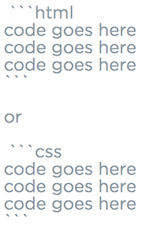
Hope this helps.
1 Answer
Wayne Priestley
19,579 PointsAlexey,
You need to place your style tags inside the body of your html. (I did notice you have a style sheet linked in your html, so I'm not sure why you have to put your css in your html but here is my answer).
<!DOCTYPE HTML>
<html>
<head>
<meta charset="utf-8">
<title>ЯпонÑкие ШÑÑÑки</title>
<link rel="stylesheet" href="css/normalize.css">
<link href='http://fonts.googleapis.com/css?family=Open+Sans:700,800,400&subset=latin,cyrillic' rel='stylesheet' type='text/css'>
<link rel="stylesheet" href="css/style.css">
</head>
<body> <!-- inside body tag -->
<header> <!-- I put your code inside header tags, the question should tell you where to put them -->
<style>
nav {
font-family: 'Open Sans', sans-serif;
Font-weight: Bold; <!-- change F to f and B to b-->
Font-size: 26px; <!-- change F to f -->
color: green;
}
</style>
</header>
<nav>
<ul>
<li>Home</li>
<li>About</li>
<li>Buy</li>
<li>Contact</li>
</ul>
</nav>
</body>
</html>
Alexey Tseitlin
5,866 PointsAll good. The error was in the name of the css file... On the server it was "Style.css", and in the html "style.css"
Thanx again) I am a noobie)
Ariel Aronica
6,646 PointsAriel Aronica
6,646 PointsAre you struggling with applying the font-family?