Welcome to the Treehouse Community
Want to collaborate on code errors? Have bugs you need feedback on? Looking for an extra set of eyes on your latest project? Get support with fellow developers, designers, and programmers of all backgrounds and skill levels here with the Treehouse Community! While you're at it, check out some resources Treehouse students have shared here.
Looking to learn something new?
Treehouse offers a seven day free trial for new students. Get access to thousands of hours of content and join thousands of Treehouse students and alumni in the community today.
Start your free trial

Eric Anderson
4,336 PointsSublime Text Not Indenting & Image Files in Lesson – am I supposed to have them locally?
Hello,
I’m brand new to all of this. Two quick questions:
1) Per instructions, I downloaded the Sublime Text editor and set it to –Indent Using Spaces; -Tab Width:2, but it’s not auto-indenting like the editor in the video is doing.
2) The instructor in the video is referencing imaging files in the code. Is there a library of image and other files that I am supposed to download in order to follow along with the lessons exactly as they are portrayed in the videos?
Thanks.
3 Answers

Elliott Frazier
Courses Plus Student 9,647 PointsSublime Text doesn't actually auto-indent where you don't have to do it, but indents it two spaces automatically when you press the tab key on your keyboard so you don't have to hit the space-bar twice(or whatever else you have the tab width set to).
You can download the project files in a zip folder located underneath the video player on the right-hand side of the screen under "Downloads"(as seen below).
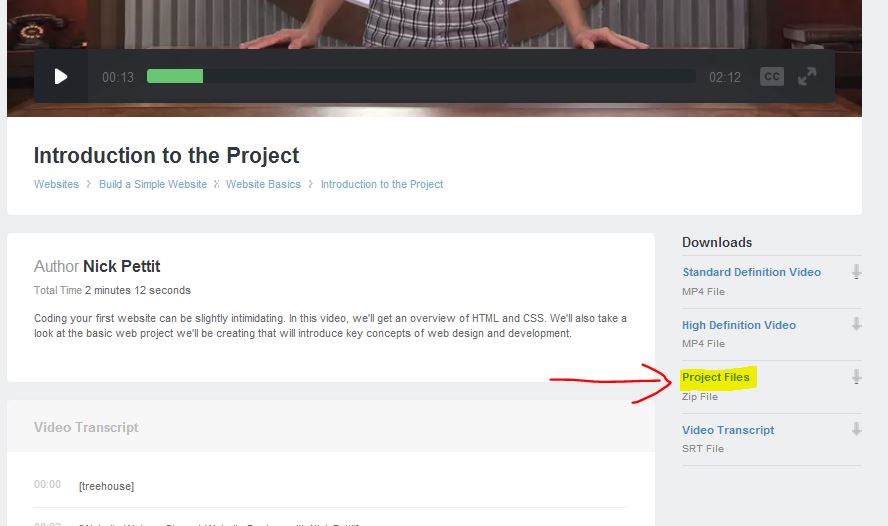
Hope this helps.

Charlie Thomas
40,856 PointsI'm not sure about sublime text but the project files are located under the video on the right hand side
Eric Anderson
4,336 PointsGreat, thank you!