Welcome to the Treehouse Community
Want to collaborate on code errors? Have bugs you need feedback on? Looking for an extra set of eyes on your latest project? Get support with fellow developers, designers, and programmers of all backgrounds and skill levels here with the Treehouse Community! While you're at it, check out some resources Treehouse students have shared here.
Looking to learn something new?
Treehouse offers a seven day free trial for new students. Get access to thousands of hours of content and join thousands of Treehouse students and alumni in the community today.
Start your free trial

a k
2,880 PointsText in menu option does not align to the left
Hello, I am trying to make a vertical menu. I have to align the text to the left. I tried by setting left padding and margins to zero and for 'li' tried by setting 'text-align'to 'left' but it doesn't have any effect. Any idea how to fix this? Thank you in advance.
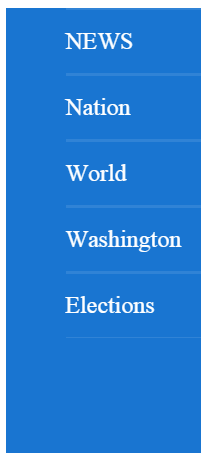
            #content {
                width: 100%;
                color: #535353;
            }

            #sidemenudiv {
                height: 1000px;
                width: 120px;
                background-color: #1975d1;
            }

            #sidemenudiv ul li {
                padding-top: 12px;
                padding-bottom: 12px;
                margin-left: 0;
                padding-left: 0;
                color: white;
                list-style-type: none;
                border-top: thin solid #3083d6;
                border-bottom: thin solid #3083d6;
            }
<div id="content">
                    <div class="fixedwidth">
                        <div id="sidemenudiv">
                                <ul>
                                    <li id="newsside">NEWS</li>
                                    <li id="nation">Nation</li>
                                    <li id="world">World</li>
                                    <li id="washington">Washington</li>
                                    <li id="elections">Elections</li>

                                </ul>
                        </div>
                    </div>
</div>
2 Answers

Andrew McCormick
17,730 Pointsmake sure you reset the padding on the ul element as well
codepen: http://codepen.io/anon/pen/OVpLad
     #sidemenudiv ul{
        margin: 0;
        padding: 0
      }
a k
2,880 PointsThank you so much. That worked.