Welcome to the Treehouse Community
Want to collaborate on code errors? Have bugs you need feedback on? Looking for an extra set of eyes on your latest project? Get support with fellow developers, designers, and programmers of all backgrounds and skill levels here with the Treehouse Community! While you're at it, check out some resources Treehouse students have shared here.
Looking to learn something new?
Treehouse offers a seven day free trial for new students. Get access to thousands of hours of content and join thousands of Treehouse students and alumni in the community today.
Start your free trial

Allison Davis
12,698 PointsTrouble with Markdown
This is a very basic question, but I am having trouble with the markdown formatting when posting to the Treehouse forum. I'm wrapping my code as described (``` on the line before and the line after the code example), but when I do so, either the line breaks don't work and/or sometimes entire sections of code are missing. Am I missing a step?
Also, I've noticed many users posting what looks like a Workspaces screenshot into their forum posts - it's on a dark background and has the color coding and formatting preserved, making it much more legible. Are you just taking a screenshot of your workspace, or is there another way?
Thank you!
1 Answer

Colin Bell
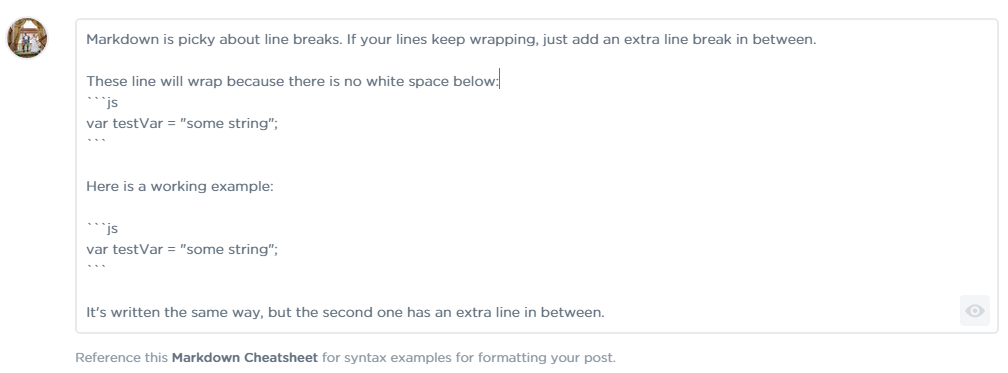
29,679 PointsMarkdown is picky about line breaks. If your lines keep wrapping, just add an extra line break in between.
Here is a screenshot of what I have written:
This is what comes up
These line will wrap because there is no white space below:
var testVar = "some string";
Here is a working example:
var testVar = "some string";
It's written the same way, but the second one has an extra line in between.
Also notice the js after the three ticks? That's telling markdown it's javascript, so it will color code accordingly. Just put whatever language you're about to use directly after those three ticks (html, css, php, etc.)