Welcome to the Treehouse Community
Want to collaborate on code errors? Have bugs you need feedback on? Looking for an extra set of eyes on your latest project? Get support with fellow developers, designers, and programmers of all backgrounds and skill levels here with the Treehouse Community! While you're at it, check out some resources Treehouse students have shared here.
Looking to learn something new?
Treehouse offers a seven day free trial for new students. Get access to thousands of hours of content and join thousands of Treehouse students and alumni in the community today.
Start your free trial

Ryan Hellerud
3,635 Pointsunwanted space being generated before nav bar
Trying to figure out whats causing this space at the top before the nav bar. www.omegadesignla.com There is a random nbsp; nbsp; space charater being generated into the html when you insepect the element, and I can't figure out whats causing it. Here is the beginning html:
<!doctype html>
<html class="no-js" lang="en">
  <head>
    <meta charset="utf-8" />
    <meta name="viewport" content="width=device-width, initial-scale=1.0" />
    <title>Omega Design | LA</title>
    <meta name="description" content="Web development and printing services serving the greater los angeles area">
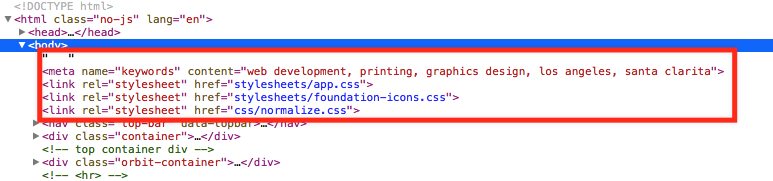
      <meta name="keywords" content="web development, printing, graphics design, los angeles, santa clarita">
    <link rel="stylesheet" href="stylesheets/app.css" />
    <link rel="stylesheet" href="stylesheets/foundation-icons.css" />
    <link rel="stylesheet" href="css/normalize.css" />
  </head>
  <body>
    <nav class="top-bar" data-topbar>
          <ul class="title-area">
            <li class="name">
              <span><a href="index.html"><img class="logo" src="img/logofinal.png"></a><span>
            </li>
            <li class="toggle-topbar menu-icon">
              <a href="#">Menu</a>
            </li>
          </ul>
          <section class="top-bar-section">
            <ul class="right">
              <li><a href="#about">About us</a></li>
              <li><a href="#" data-reveal-id="myModal">Contact us</a></li>
                <li class="has-dropdown">
                  <a href="#">Services</a>
                  <ul class="dropdown">
                    <li><a href="services.html#printing">Print Media</a></li>
                    <li><a href="services.html">Web Development</a></li>
                   <!--  <li><a href="services.html">Promotional Items</a></li> -->
                    <!-- <li class="active"><a href="#">Active link in dropdown</a></li> -->
                  </ul>
                </li>
            </ul>
          </section>
        </nav>
  <div class="container">
    <header>

      <div class="row">
        <div class="large-3 medium-3 small-6 small-centered columns"> <!-- large centered -->
        <a id="topbutton" href="#" class="button large radius button">Take the tour!</a>

        </div>


      </header>
2 Answers

Ricky Catron
13,023 PointsI just ran your code through the W3 validator and I got a lot of errors.
When HTML has errors it does its best to render the page which can cause odd things to happen. If the issue persists after fixing this it is likely padding or margin. I would use inspect element on every part of the header to check.
Goodluck! --Ricky

Job Thomas
9,441 PointsIt also seems you had more than just the " " you took with:
Ryan Hellerud
3,635 Pointswhat do you mean? Also I tried looking at the validator and tried fixing some of the issues but it didnt seem to do anything. And I don't understand some of the errors. Also, If you look at the services page the space is not there.
Also if you delete the " " in the inspector html the problem goes away any suggestions?
Ryan Hellerud
3,635 PointsRyan Hellerud
3,635 PointsAlso I tried looking at the validator and tried fixing some of the issues but it didnt seem to do anything. And I don't understand some of the errors. Also, If you look at the services page the space is not there.
Also if you delete the " " in the inspector html the problem goes away any suggestions?