Welcome to the Treehouse Community
Want to collaborate on code errors? Have bugs you need feedback on? Looking for an extra set of eyes on your latest project? Get support with fellow developers, designers, and programmers of all backgrounds and skill levels here with the Treehouse Community! While you're at it, check out some resources Treehouse students have shared here.
Looking to learn something new?
Treehouse offers a seven day free trial for new students. Get access to thousands of hours of content and join thousands of Treehouse students and alumni in the community today.
Start your free trial

Ektoras Drandakis
29,580 PointsUsing autolayout with navigation bar
When i use auto layout to make a controller compatible for iPhone 4s the layout is correct but when i add a navigation controller the bar hides the top labels i've added. Can you tell me how can i fix this?
1 Answer

Stone Preston
42,016 Pointstry this: select your view controller. in the attributes inspector there should be an extend edges option. make sure you check "under top bars"
below is a picture of what the attributes inspector will look like. the extend edges has a under top bars option you need to check.
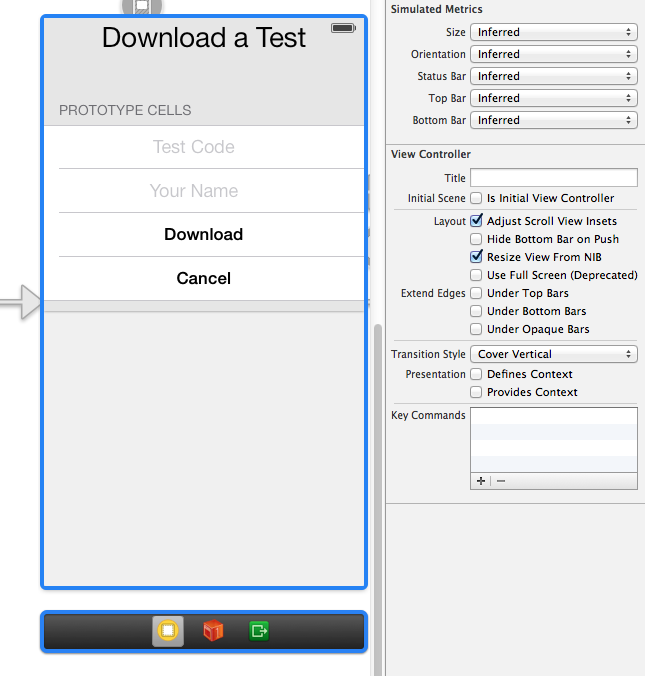
you might have to redo your constraints after this.
Ektoras Drandakis
29,580 PointsEktoras Drandakis
29,580 PointsHello stone, i have the under top bar checked but it's still the same
Stone Preston
42,016 PointsStone Preston
42,016 Pointsyou will have to upload your screen shot to an image host such as imgur. you can link it from your computer.
you may need to adjust your auto layout constraints to make it work. the old constraints might not be using the new upper layout guide that got set when you checked the box
Ektoras Drandakis
29,580 PointsEktoras Drandakis
29,580 PointsI think it was already checked, but i did it again and it's still the same
http://i.imgur.com/C1z2FBx.png
I did it like the use auto layout video from building a simple iPhone app on the course