Welcome to the Treehouse Community
Want to collaborate on code errors? Have bugs you need feedback on? Looking for an extra set of eyes on your latest project? Get support with fellow developers, designers, and programmers of all backgrounds and skill levels here with the Treehouse Community! While you're at it, check out some resources Treehouse students have shared here.
Looking to learn something new?
Treehouse offers a seven day free trial for new students. Get access to thousands of hours of content and join thousands of Treehouse students and alumni in the community today.
Start your free trial

Alexander Batalov
21,887 PointsViewing Images from Parse (a Self-Destructing Message iPhone App)
Hi all,
While watching video ( Learn to Build iPhone Apps / Build a Self-Destructing Message iPhone App / Retrieving and Viewing Data from Parse.com / Viewing Images Using UIImageView ) I'm faced with the following problem: My imageFile is Empty :/ Here goes my code:
- (void)viewDidLoad
{
    [super viewDidLoad];
    PFFile *imageFile = [self.message objectForKey:@"file"];
    NSURL *imageFileURL = [[NSURL alloc] initWithString:imageFile.url];
    NSData *imageData = [NSData dataWithContentsOfURL:imageFileURL];
    self.imageView.image = [UIImage imageWithData:imageData];
And the error message:
    'NSInvalidArgumentException', reason: '*** -[NSURL
initWithString:relativeToURL:]: nil string parameter'
I tried to NSLog imageFile.url and even imageFile itself but it gives me nil couple times.
At parse back end image exists as it should be, so I'm pretty sure it just don't downloads for some reason.
Please help me.
3 Answers

Ben Jakuben
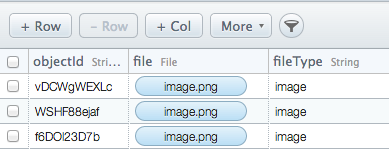
Treehouse TeacherFirst things first, can you confirm in Parse's Data Browser that "file" is the appropriate name and spelling to use? That's what we use in the videos, but if you typed it differently then it could be causing this error. If it's correct, does it show "image.png" in the column, like this?:
Alexander Batalov
21,887 PointsAnd yeah, I'm running it with iOs 7, so may be there is some difference with the previous versions? Because the code is exactly the same with code from video :) and I have no idea why I'm getting an empty object from Parse.
Alexander Batalov
21,887 Points.
Alexander Batalov
21,887 PointsAlexander Batalov
21,887 PointsThank you @Ben for the answer. But I checked it couple times and all the names are spelled correctly. After my analysis I came up with conclusion that I placed the pice of code that asks Parse for PFFile in wrong place or my segue works incorrectly.
There is a fact that for some unknown for me reasons I can't drop segue from Inbox View Controller - to - Image View Controller XCode 5.0.2 + iOs7 just do not allow me to do so :) The only possible way was to make segue from Cell- to - Image View Controller so did I, aaand obviously it won't work.
Will be happy as a kid, if you give me hint or any mile stones to follow, how to perform a segue from cell at Inbox View Controller?
P.S.: Please try to make segue from entire Inbox View Controller - to - Image View Controller on XCode 5.0.2 + iOs7 who knows, may be I'm the only one who can't do this. And many thanks for the course, really appreciate this!
Ben Jakuben
Treehouse TeacherBen Jakuben
Treehouse TeacherI am able to create the segue without any issue on Xcode 5.0.2. One thing that's weird about Interface Builder is that you need to make sure the view controller itself is selected to create the segue. Check out this screenshot where I Control-click on the view controller icon under the view itself: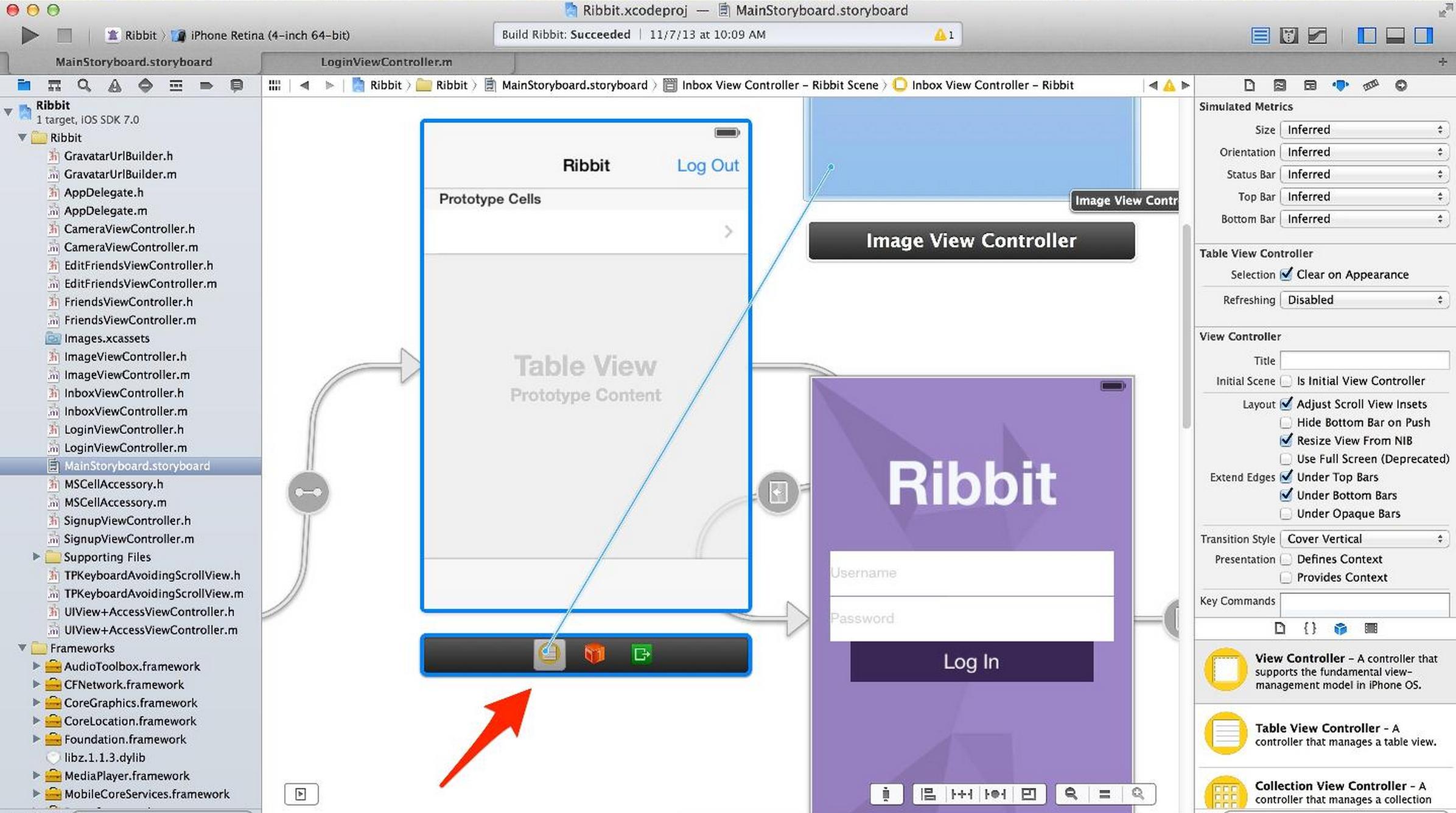
Alexander Batalov
21,887 PointsAlexander Batalov
21,887 PointsYay! It works! Many thanks :)