Welcome to the Treehouse Community
Want to collaborate on code errors? Have bugs you need feedback on? Looking for an extra set of eyes on your latest project? Get support with fellow developers, designers, and programmers of all backgrounds and skill levels here with the Treehouse Community! While you're at it, check out some resources Treehouse students have shared here.
Looking to learn something new?
Treehouse offers a seven day free trial for new students. Get access to thousands of hours of content and join thousands of Treehouse students and alumni in the community today.
Start your free trial

Charissa Cardwell
1,065 PointsWhen I enter the code or implement changes the view does not change at all. What am I doing wrong? Even after saving
I'm using a computer with Microsoft 10 does this make a difference?

Charissa Cardwell
1,065 PointsYes La Vaughn that is what I mean.

LaVaughn Haynes
12,397 PointsDo you know how to share your workspace? If not let me know and I will show you.
Charissa Cardwell
1,065 PointsNo I don't know how to share it
LaVaughn Haynes
12,397 PointsThere is an snapshot icon in the upper right corner that looks like a camera. See the link below.
http://workspace.bonvon.com/temp/snapshot.gif
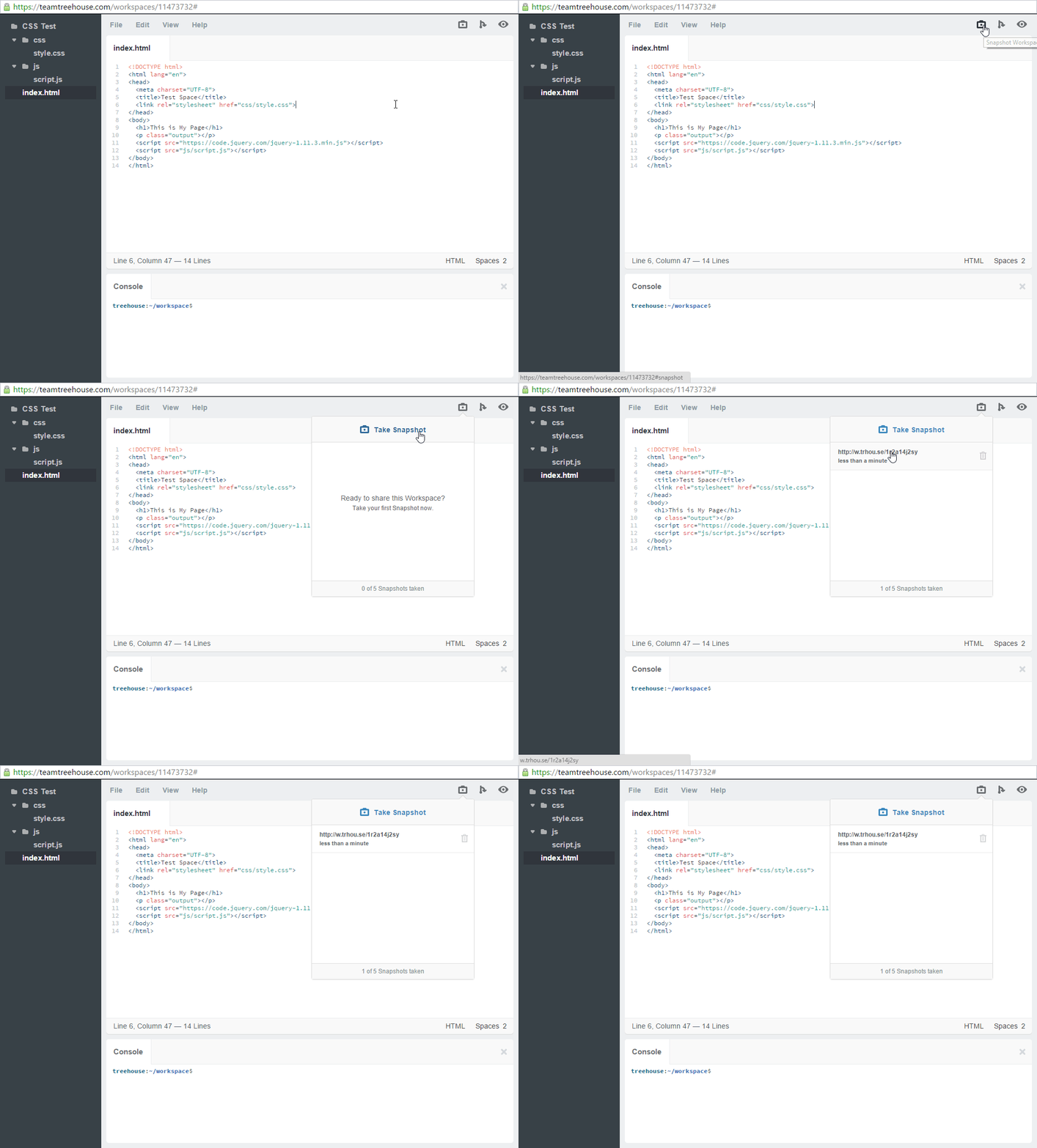
Open your workspace. Click the icon. Get that link and paste it here in the comments
Charissa Cardwell
1,065 Points
LaVaughn Haynes
12,397 PointsYes, your code looks fine. The only thing that I can see is that your border radius might need to be prefixed for it to work depending on what browser you are using. (on second though, probably not). Your code works though.
You may need to just restart the browser.
5 Answers

Jason Anders
Treehouse Moderator 145,863 PointsHi Charissa,
I loaded your Workspace and previewed in my browser (Chrome). Any change I made in the CSS was reflected when I refreshed the browser page.
I don't know which browser you are using, but if your not seeing changes (after refreshing the browser page), it may be a cache issue. Also, this may be a mute question, but you are refreshing your browser page after saving the new CSS?
:)
Charissa Cardwell
1,065 PointsNo I'll try that thanks

Ethan Young
3,388 PointsYou're most likely forgetting an element, such as a quotation mark, a curly brace, a semicolon, etc etc... the browser is what has the most effect on how you view your code, not your operating system, but I really wouldn't know what your problem is unless you pasted your code.

Zach Patrick
19,209 PointsMake sure that you included the link to the CSS file inside your head tags. That was a common mistake that I made when I was starting out.
Zach Patrick
19,209 PointsEverything appears to be in working order. I made a few changes and tested them to make sure they were working and everything seems fine. Did you try closing workspaces and reopening it?
Charissa Cardwell
1,065 PointsThanks Everyone!
LaVaughn Haynes
12,397 PointsLaVaughn Haynes
12,397 Points?? What view? Do you mean workspaces doesn't update to reflect your CSS changes?