Welcome to the Treehouse Community
Want to collaborate on code errors? Have bugs you need feedback on? Looking for an extra set of eyes on your latest project? Get support with fellow developers, designers, and programmers of all backgrounds and skill levels here with the Treehouse Community! While you're at it, check out some resources Treehouse students have shared here.
Looking to learn something new?
Treehouse offers a seven day free trial for new students. Get access to thousands of hours of content and join thousands of Treehouse students and alumni in the community today.
Start your free trial

Michael McKenna
3,451 PointsWhy am I getting the error "cannot resolve symbol page0" when doing the Interactive Story app?
This is in under the class in Story.java. Everything is the same as in the video, so I am not sure what is wrong. Any input would be greatly appreciated.
public class Story {
    private Page[] mPages;

    public Story() {
        mPages = new Page[7];

        mPages[0] = new Page(
                R.drawable.page0,
                "On your return trip from studying Saturn's rings, you hear a distress signal that seems to be coming from the surface of Mars. It's strange because there hasn't been a colony there in years. Even stranger, it's calling you by name: \"Help me, %1$s, you're my only hope.\"",
                new Choice("Stop and investigate", 1),
                new Choice("Continue home to Earth", 2));

        mPages[1] = new Page(
                R.drawable.page1,
                "You deftly land your ship near where the distress signal originated. You didn't notice anything strange on your fly-by, but there is a cave in front of you. Behind you is an abandoned rover from the early 21st century.",
                new Choice("Explore the cave", 3),
                new Choice("Explore the rover", 4));

        mPages[2] = new Page(
                R.drawable.page2,
                "You continue your course to Earth. Two days later, you receive a transmission from HQ saying that they have detected some sort of anomaly on the surface of Mars near an abandoned rover. They ask you to investigate, but ultimately the decision is yours because your mission has already run much longer than planned and supplies are low.",
                new Choice("Head back to Mars to investigate", 4),
                new Choice("Continue home to Earth", 6));

        mPages[3] = new Page(
                R.drawable.page3,
                "Your EVA suit is equipped with a headlamp, which you use to navigate the cave. After searching for a while your oxygen levels are starting to get pretty low. You know you should go refill your tank, but there's a very faint light up ahead.",
                new Choice("Refill at ship and explore the rover", 4),
                new Choice("Continue towards the faint light", 5));

        mPages[4] = new Page(
                R.drawable.page4,
                "The rover is covered in dust and most of the solar panels are broken. But you are quite surprised to see the on-board system booted up and running. In fact, there is a message on the screen: \"%1$s, come to 28.543436, -81.369031.\" Those coordinates aren't far, but you don't know if your oxygen will last there and back.",
                new Choice("Explore the coordinates", 5),
                new Choice("Return to Earth", 6));

        mPages[5] = new Page(
                R.drawable.page5,
                "After a long walk slightly uphill, you end up at the top of a small crater. You look around, and are overjoyed to see your favorite android, %1$s-S1124. It had been lost on a previous mission to Mars! You take it back to your ship and fly back to Earth.");

        mPages[6] = new Page(
                R.drawable.page6,
                "You arrive home on Earth. While your mission was a success, you forever wonder what was sending that signal. Perhaps a future mission will be able to investigate...");
    }

    public Page getPage(int pageNumber) {
        return mPages[pageNumber];
    }
}
2 Answers

Harry James
14,780 PointsHey Michael!
This code looks good to me! It seems something must've gone wrong on Android Studio's side. Please try all of the below methods until one of them works (I know, it's a pain but, there's no real way of knowing what's causing the problem):
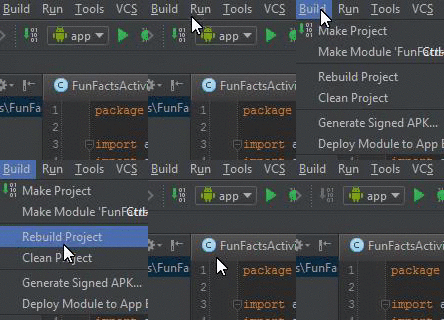
1) Try Cleaning the project. To do this, click on the Build tab and then Clean Project and wait for the Clean to finish:
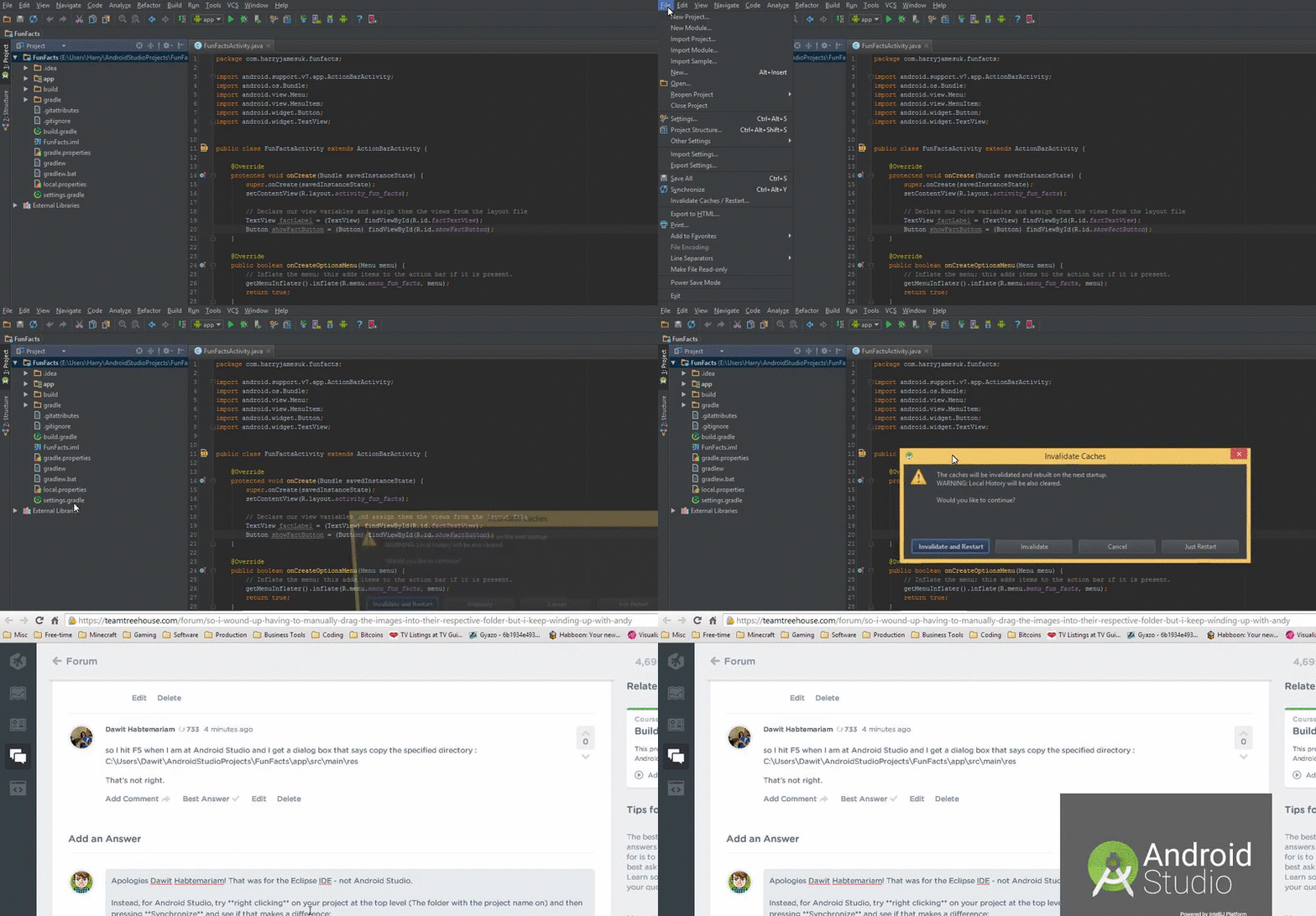
2) If you are still having issues, try Invalidating Android Studio's caches. To do this, click on the File tab then Invalidate Caches / Restart and press Invalidate and Restart:
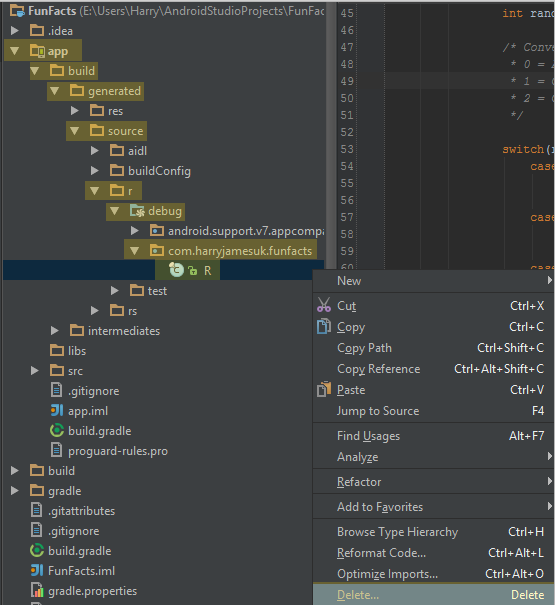
3) Try deleting R.java (It will regenerate). To do this, go to app/build/generated/source/r/debug/com.yourpackage.name/ and right-click on the R class and press Delete:
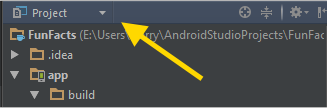
If you do not see the folders listed like this, make sure you are in the Project View - This is found at the top of the Project Explorer:
If none of the above methods work, give me a shout and I'll see if there's something else that can be done.
Hopefully, one of these will work though :)
Michael McKenna
3,451 PointsWOW you are amazing. Not only did you take time to write all of this out, you even included clips! Thank you so much. The first two worked for me. I will definitely be coming back here to help diagnose future problems, and hopefully others can find this too. Thanks again!
Harry James
14,780 PointsWoohoo!
Glad that the clips helped you and yes, please do ask away on these forums! That's the point of them and, I personally love answering questions from people because not only do you get a warm feeling from helping other people out but, also it improves your own knowledge :)