Welcome to the Treehouse Community
Want to collaborate on code errors? Have bugs you need feedback on? Looking for an extra set of eyes on your latest project? Get support with fellow developers, designers, and programmers of all backgrounds and skill levels here with the Treehouse Community! While you're at it, check out some resources Treehouse students have shared here.
Looking to learn something new?
Treehouse offers a seven day free trial for new students. Get access to thousands of hours of content and join thousands of Treehouse students and alumni in the community today.
Start your free trial

Rich Eberle
2,865 PointsWhy does my website work on my local server but not when uploaded to FTP?
i just made this website for an artist friend of mine using javascript for the first time. I basically have a couple .html files, .css files, and .js files. The website looks amazing on my local server using MAMP, however when I transferred the files to the server, the website comes up with an error message.
I know this is probably vague and a ton of things could have gone wrong - I was just wondering if i needed to add like a .txt file or sitemap file to the FTP for it to run with js? I just cant figure out why it works on MAMP but not live..
7 Answers

James Barnett
39,199 PointsMake sure the file permissions match, they should almost always be 644 in octal or in other words. set Owner to read write execute & set group & other to read write.
Here's a tutorial on how to do just that: using cyberduck and here's one using filezilla
Rich Eberle
2,865 PointsThanks so much James! Gunna try that out!

Dustin Matlock
33,856 PointsIt also helps to know if you're on shared hosting or a VPS. With shared hosting it should already be set for the correct file permissions. Make sure your files are in either public_html or www and so on.
What is the error message?

James Barnett
39,199 Points> With shared hosting it should already be set for the correct file permissions.
Not necessarily.
If you don't platy attention to checkboxes on an FTP client, I've seen other Treehouse users run into difficulty there.
> Make sure your files are in either public_html or www
Definitely double check that your ftp account is putting your files in the right place.

Dustin Matlock
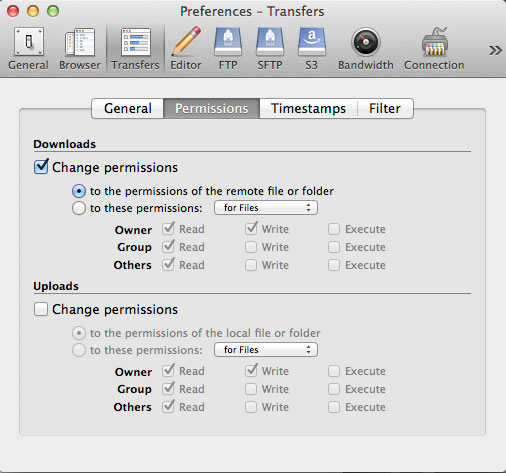
33,856 PointsHere are the default settings with Cyberduck on the Mac. FileZilla documentation is not great but it should be easy to figure out.

Joe Timmons
4,331 PointsWhat is the error message? If you could post a link to the test website, we can take a look at it. It could be as simple as absolute vs relative paths to your included files.
Rich Eberle
2,865 PointsThanks for all the help.
I've tried adjusting the permissions settings with no luck.
this is the website: http://hackworthashley.com/
It's hosted by http://www.a2hosting.com/ and I'm using Cyberduck as the FTP.
His brother created the website years ago and there was a ton of stuff in the FTP already - I went through and deleted most of it. Now, all my files are just laid out in their folders there. Do I need to put them in a www or public_ftp folder or something?
Do I need to use a .php to run javascript?
Dustin Matlock
33,856 PointsAll the files you have need to go in the www folder, not the FTP folder. No need for PHP if you will not be hosting PHP files, but shared hosting should have it installed anyway.
When you say someone created the website, I'm guessing that you are referring to the registration of the domain name. One last obvious check is that you need to set the nameservers for the domain to your host's nameservers.
You'd obviously want to delete the old files (www folder) from the original website (if that is the original hosting) if you are starting over on this website for your artist friend.
Most all the solutions to the issues you're having should be found in your host's knowledge base.
Rich Eberle
2,865 PointsThanks guys - I finally got the site up with your help - here it is: http://hackworthashley.com/