Welcome to the Treehouse Community
Want to collaborate on code errors? Have bugs you need feedback on? Looking for an extra set of eyes on your latest project? Get support with fellow developers, designers, and programmers of all backgrounds and skill levels here with the Treehouse Community! While you're at it, check out some resources Treehouse students have shared here.
Looking to learn something new?
Treehouse offers a seven day free trial for new students. Get access to thousands of hours of content and join thousands of Treehouse students and alumni in the community today.
Start your free trial

Kelvin Atawura
Front End Web Development Techdegree Student 19,022 Pointsxcode 5
l am trying to run my app on my iOS device but keep getting this error
Code Sign error: No matching codesigning identity found: No codesigning identities (i.e. certificate and private key pairs) matching “iPhone Developer” were found. CodeSign error: code signing is required for product type 'Application' in SDK 'iOS 7.0'
how do l make it right,please?
3 Answers

Patrick Cooney
12,216 PointsTo tag Amit Bijlani and Ben Jakuben you use an @ symbol and then their name rather than putting their names in the tags at the bottom.
I'm thinking you need to go into the Apple developer portal and create new certificates since you are using a new version of Xcode. Though I could be entirely wrong.

Ben Jakuben
Treehouse TeacherHi Hackey,
Have you registered with Apple yet? Check out this video from Amit's Build a Simple iPhone project for details about setting up an account and running on a device. To run on a physical device you need to sign up for the Apple Developer program, which is $100/year.

Kelvin Atawura
Front End Web Development Techdegree Student 19,022 PointsYes l am registered with apple. Thank you very much

Amit Bijlani
Treehouse Guest TeacherYou have to check two things:
Go into preferences (Cmd+,) and add your iOS Dev Account in the Accounts tab.
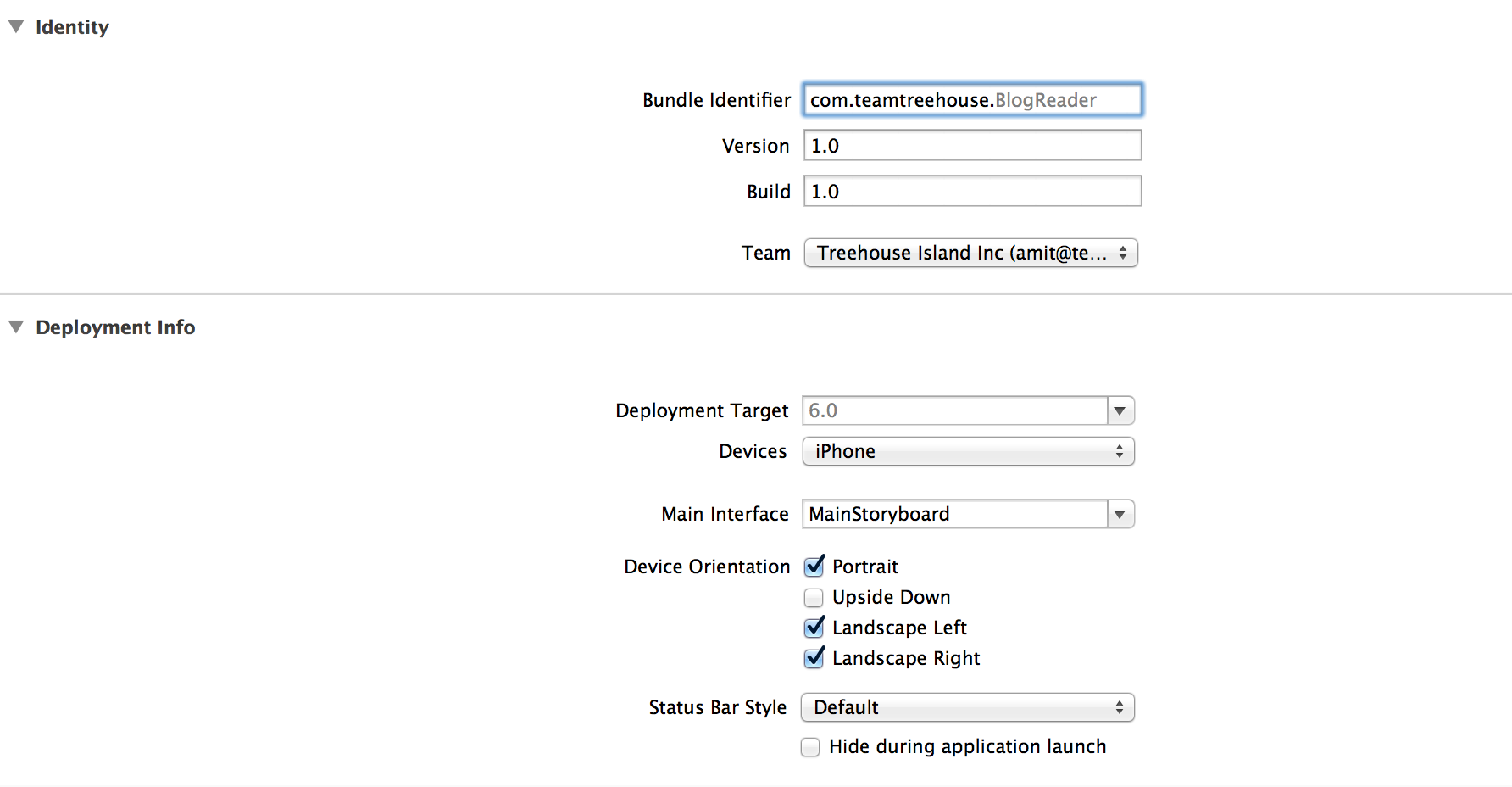
Open up your project settings and make sure you have selected a Team from the drop-down. And that your Bundle identifier matches your certificate. See image below:
Kelvin Atawura
Front End Web Development Techdegree Student 19,022 PointsGot it working now. thank you very much
Otto Wichmann
4,827 PointsOtto Wichmann
4,827 PointsI'll take a wild stab at this. Why are you using Xcode 5. You want to use 4.6.3 unless you really know what you are doing.
Cheers